About caddy/ui
A modern web interface for managing your Caddy server. Built from scratch in a single conversation with Claude.
Overview
caddy/ui manages one or more Caddy servers through their admin APIs. It runs as two Docker containers alongside Caddy. Your Caddyfile remains the source of truth: you can edit it directly or through the UI.
Start with the quickstart, explore the features and screenshots, or read the architecture guide.
Features
Manage Caddy configuration, monitor your servers, and inspect logs from one interface. Your Caddyfile remains the source of truth.
Configure traffic
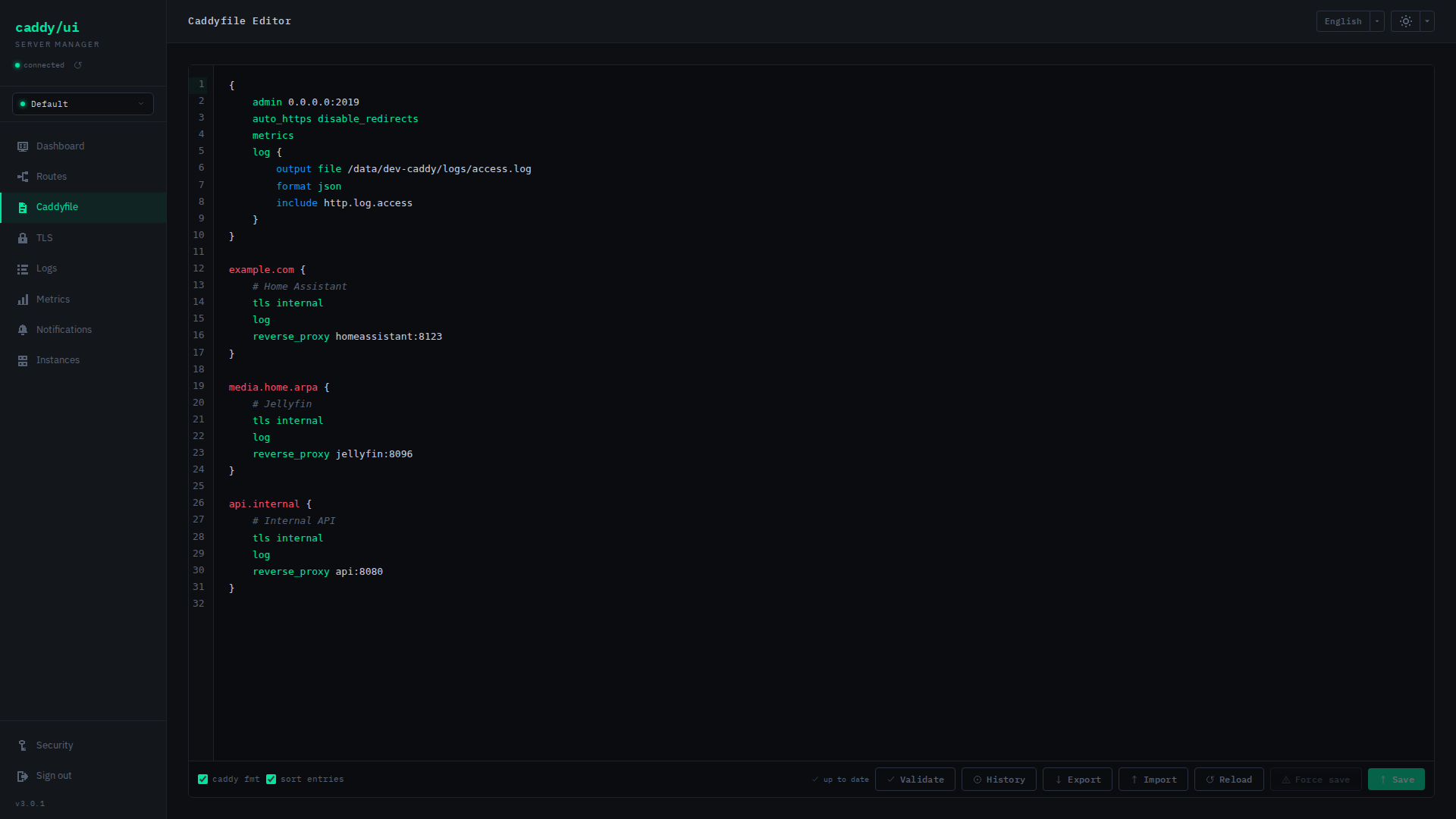
- Caddyfile editor Edit with syntax highlighting, validate and format configurations, and restore saved versions.
- Route manager
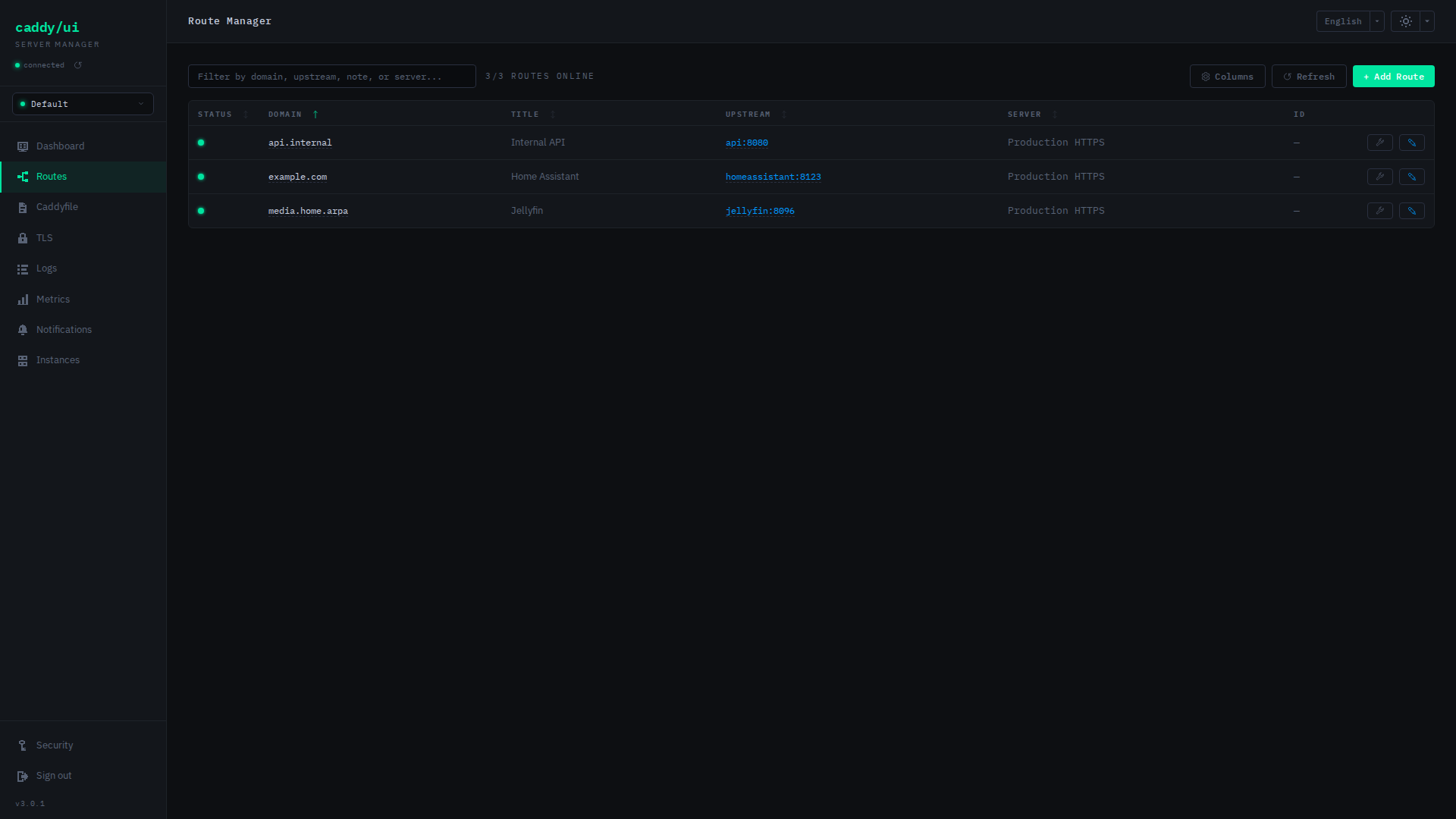
Find routes across HTTP servers, edit upstreams, and keep notes alongside them.
Routes without an explicit title display the first hostname’s leftmost DNS
label in italics (for example,
jellyfin.example.debecomes jellyfin). Clearing a custom title restores this default. Uptime labels use the same fallback; status history headings keep the full domain unless an explicit title exists. The fallback is display-only and does not change notes or the Caddyfile; wildcard, IP, placeholder and hostless routes stay untitled. - Configuration workflow Import or export a Caddyfile and reload Caddy from the UI.
See the editor, route manager, and Caddyfile guide.
Monitor health
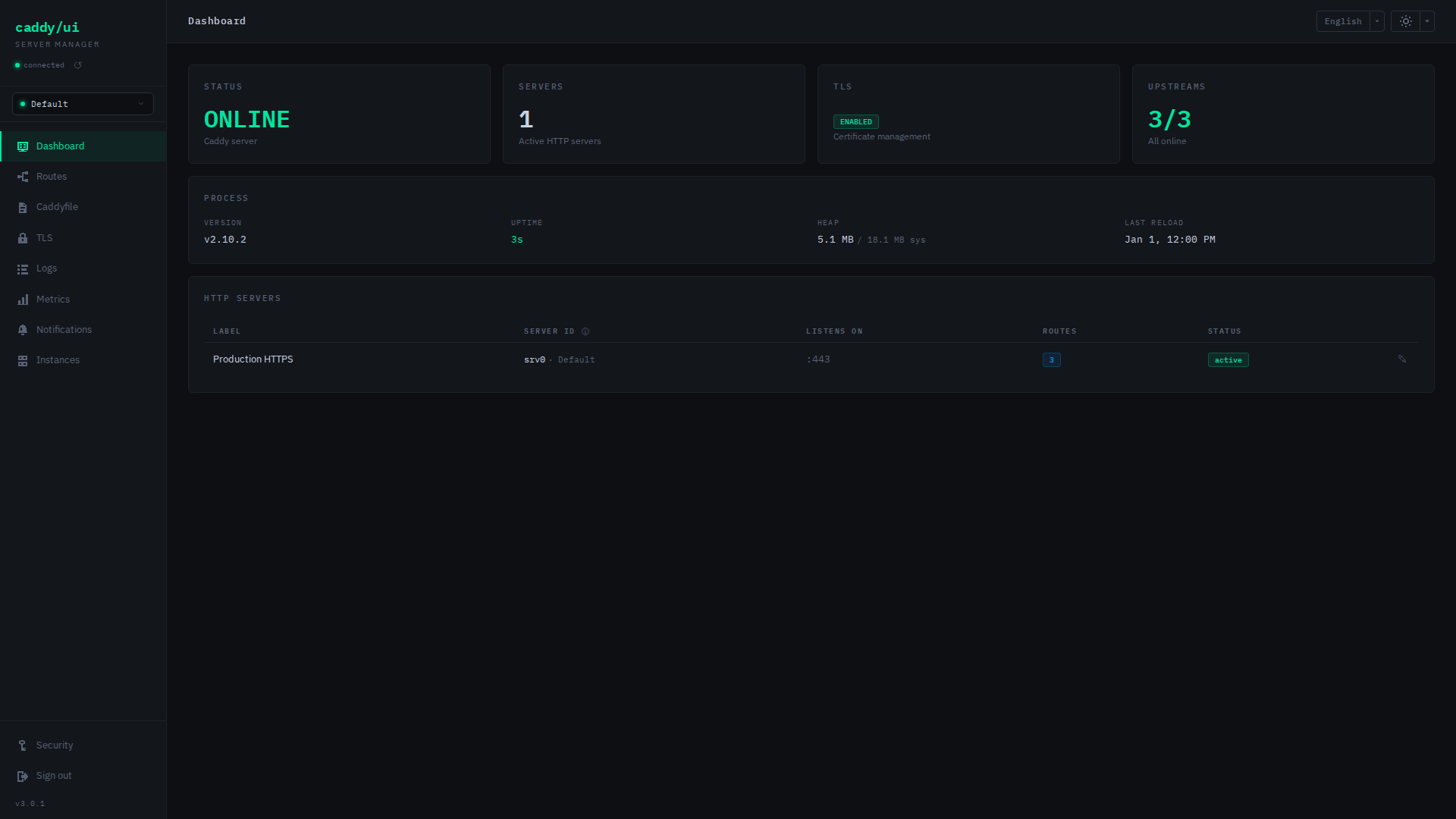
- Dashboard Check server status, upstream health, TLS state, and Caddy process information.
- Metrics and uptime Follow traffic, latency, and upstream history; enable optional route checks.
- Logs Tail live output, filter by severity or keyword, export logs, and configure access logging.
- Notifications Receive alerts for health changes and expiring certificates through your chosen notification service, including self-hosted services on your network.
See metrics, logs, and integrations.
Manage certificates and instances
- TLS certificates Inspect expiry dates, remove orphaned certificates, and download Caddy’s root CA.
- Multiple instances Discover Docker containers or add local Caddy installations, then switch between them from the sidebar.
See certificates and the instance guide.
Adjust access and appearance
- Authentication Protect the UI and API with persistent administrator credentials, cookie sessions and CSRF checks.
- Themes Choose built-in dark and light palettes or provide a custom theme.
- Navigation Bookmark pages and filtered views, with a responsive layout for smaller screens.
See authentication and custom themes.
Detailed capabilities
Expand either list for the complete feature reference, including configuration options and implementation details.
Full frontend feature list
- Dashboard — Server and TLS status, HTTP server labels/listeners/route counts, upstream health, and Caddy version, uptime, memory and reload information
- Caddyfile Editor — Caddyfile grammar highlighting, live validation,
caddy fmt, site sorting, import/export, and version history with previews and rollback - Route Manager — Routes across HTTP servers, health and uptime, search, sortable/configurable columns, domain/upstream links, inline editing and notes
- TLS Certificates — Certificate status and expiry, orphan cleanup, and root CA download with OS installation instructions
- Logs — Live SSE streaming, keyword/severity filters, export, and access-log configuration
- Metrics — Request counts, RPS, response times, status codes and p50/p95/p99 latency from Caddy’s Prometheus endpoint
- Uptime — Upstream state, uptime and history sampled every 30 seconds. Optional route checks request sites through Caddy every 5 minutes (
caddy-ui-route-check), detecting 5xx responses, timeouts and invalid TLS certificates; Caddy’s local CA is trusted automatically. Failures show their cause, and individual routes can be skipped. Route checks default to off because they add access-log entries and request metrics. - Notifications — ntfy, Discord, Slack, Pushover or custom webhooks for upstream/route state changes and expiring certificates or API tokens, with trigger controls and debounce. Route alerts require route checks. LAN/Docker destinations work; loopback and link-local addresses are blocked, and redirects are not followed.
- Themes — 13 dark and 13 light palettes, independent dark/light selections, a first-run picker, and custom themes in
THEMES_PATH. Preferences persist insettings.json. - Navigation — Browser history, bookmarks and filtered deep links (e.g.
/routes?filter=srv0) - Authentication — Persistent administrator credentials, cookie sessions, CSRF protection and recovery keys
- Multi-Instance — Discover Caddy containers, add/edit/remove instances, and switch servers from the sidebar
- Mobile Friendly — Responsive layout with collapsible sidebar
Backend capabilities
- Caddy admin API access (
/config,/id,/load) and Caddyfile validation via/adapt - Caddyfile reads/writes, site sorting (public → internal → http), and route block updates
- Formatting and version detection through
docker execin Docker mode (requires the socket mount) - Route discovery across HTTP servers, including nested upstreams
- Upstream pool health checks with TCP fallback, plus persisted upstream/route history (7-day default retention)
- Notification providers and trigger controls with configurable debounce
- Certificate expiry checks, orphan/superseded/expired certificate cleanup, and root CA download
- Caddyfile snapshots on save, live SSE logs, and access-log configuration
- Persistent server labels, route notes and UI settings
- Administrator cookie sessions, CSRF protection and scoped read-only integration tokens
- Caddy process/HTTP metrics, metrics configuration, and optional public Prometheus scraping
- Structured JSON logs (
LOG_LEVEL) and status/uptime data for Homepage widgets
Screenshots
Dashboard
Caddyfile Editor
Route Manager
TLS Certificates
Access Logs
Metrics
Notifications
Instances
Architecture
The Nginx frontend proxies API requests to the Node.js/Express backend, which talks to Caddy’s admin API.
Docker mode uses the socket for container discovery and file operations. Local mode supports Caddy outside Docker. The backend’s persistent config directory holds credentials, settings and instance data.
Request flow
flowchart LR
    accTitle: Request flow
    accDescr: The frontend proxies API requests to the backend. The backend communicates with Caddy's admin API.
    FE["caddy/ui frontend<br/>React + nginx<br/>:9877"]
    BE["caddy/ui backend<br/>Node.js + Express<br/>:9876"]
    CA["Caddy<br/>:2019 Admin API<br/>:80 / :443"]

    FE -->|"/api/*"| BE
    BE -->|"Admin API"| CA
    BE -->|"upstream TCP checks + passive health pool"| CA
    BE -->|"Prometheus metrics"| CA
    BE -->|"/adapt validation"| CA
    BE -->|"/pki/ca/local"| CA
The frontend serves the interface and proxies API requests. The backend handles Caddy operations, application settings, and instance data.
Files and persistent data
flowchart TB
    accTitle: Files and persistent data
    accDescr: In Docker mode the backend accesses Caddy container files through the Docker Engine. In local mode it accesses mounted files directly. Application data is stored separately.
    BE["caddy/ui backend"]
    DOCKER["Docker Engine"]
    LOCAL["Mounted Caddy files<br/>Local mode"]
    DATA[("caddy/ui data<br/>/etc/caddy-ui")]
    FILES["Caddy container files<br/>Caddyfile, logs, certificates"]

    BE -->|"Docker socket"| DOCKER
    DOCKER -->|"exec / stream"| FILES
    BE -->|"Direct access"| LOCAL
    BE -->|"Read / write"| DATA
Docker mode uses container discovery and commands inside the selected Caddy container. Local mode reads and writes paths mounted into the backend and uses its bundled Caddy binary. Both modes communicate with the instance’s admin API. See the instance guide for setup and file permissions.
Responsibilities
| Connection or storage | Purpose |
|---|---|
| Frontend → backend | Forward /api/* requests from the browser. |
| Backend → Caddy admin API | Read configuration, validate through /adapt, reload through /load, inspect the upstream health pool, and download the root CA through /pki/ca/local. |
| Backend → metrics and upstreams | Read Prometheus metrics; run TCP health checks and optional HTTP route checks. |
| Backend → Docker Engine | Discover Caddy containers and access their Caddyfiles, logs, and certificates through the Docker socket. |
| Backend → mounted Caddy files | Access files directly in local mode. |
Backend → /etc/caddy-ui | Persist instance registrations, configuration history, route notes, settings, and application configuration. |
See the API reference, configuration, and integrations for individual endpoints and settings.
Quickstart
For Caddy installations outside Docker, see local-mode instances.
Prerequisites
- Docker and Docker Compose
- An existing Caddy container with the admin API enabled on
0.0.0.0:2019
1. Enable Caddy’s admin API
Add the following to your Caddyfile global block:
{
    admin 0.0.0.0:2019
    email {$EMAIL}
}
Note: the
CADDY_ADMINenvironment variable does not configure this — it must be set in the Caddyfile.
2. Create required directories
mkdir -p /docker/caddy/logs
mkdir -p /docker/caddy-ui
3. Plan administrator setup
No authentication environment variables are needed for a new installation. Open the UI after deployment, create the administrator and save the one-time recovery key. Until setup finishes, management endpoints remain locked. The first visitor can establish credentials, so keep an uninitialized installation reachable only by its intended administrator.
Keep /etc/caddy-ui mounted persistently: it contains the credential hashes alongside the existing settings and metadata.
4. Update your compose file
services:
  caddy:
    image: caddy:latest
    container_name: caddy
    restart: unless-stopped
    ports:
      - 80:80
      - 443:443
    environment:
      - CADDY_LOG_PATH=/var/log/caddy/access.log
      - DOMAIN=example.com
      - EMAIL=you@example.com
      - TZ=America/New_York
    volumes:
      - /docker/caddy/Caddyfile:/etc/caddy/Caddyfile
      - /docker/caddy/data:/data
      - /docker/caddy/config:/config
      - /docker/caddy/logs:/var/log/caddy
    networks:
      - caddy-ui

  caddy-ui-backend:
    image: zackwag/caddy-ui-backend:latest
    container_name: caddy-ui-backend
    restart: unless-stopped
    ports:
      - 9876:3001
    environment:
      - TZ=America/New_York
      # Optional -- opt into installed preview UI languages (reviewed languages are enabled by default)
      - CADDY_UI_ADDITIONAL_LANGUAGES=es-es
      # Browser-facing URL: replace your-server with the host you open in your browser.
      # Required for browser writes over plain HTTP; behind HTTPS use the external HTTPS URL.
      - CADDY_UI_EXTERNAL_URL=http://your-server:9877
      # Authentication is required; create credentials in the UI.
    volumes:
      - /var/run/docker.sock:/var/run/docker.sock
      - /docker/caddy-ui:/etc/caddy-ui
    networks:
      - caddy-ui
    depends_on:
      - caddy

  caddy-ui-frontend:
    image: zackwag/caddy-ui-frontend:latest
    container_name: caddy-ui-frontend
    restart: unless-stopped
    ports:
      - 9877:80
    networks:
      - caddy-ui
    depends_on:
      - caddy-ui-backend

networks:
  caddy-ui:
    driver: bridge
The backend needs only the Docker socket for discovery and file operations in Caddy containers, plus its persistent config directory for credentials, instances, history and settings. It does not need Caddy’s volumes mounted directly.
5. Deploy
docker compose up -d
Open http://your-server:9877 in your browser.
Continue with configuration or instance discovery.
Configuration
Environment Variables
Most backend variables have sensible defaults. Set CADDY_UI_EXTERNAL_URL for browser writes over plain HTTP; otherwise only set what you need to override.
| Variable | Default | Description |
|---|---|---|
APP_VERSION | dev | caddy-ui’s own version, exposed at GET /api/version and shown in the sidebar. Baked in automatically by the release build (docker build --build-arg APP_VERSION=...) — no need to set by hand unless building from source and want the UI to report a specific version. |
CADDY_ADMIN_URL | — | URL of Caddy’s admin API. If set, a default instance is auto-created on first startup. If unset, caddy/ui starts with no instances and guides you through discovery. |
CADDYFILE_TITLES | auto | Store route titles as # comments in the Caddyfile (see Caddyfile Titles) |
CADDY_CONFIG_PATH | /etc/caddy/Caddyfile | Path to the Caddyfile inside the Caddy container (only used with CADDY_ADMIN_URL) |
CADDY_CONTAINER_NAME | caddy | Name of the Caddy Docker container (only used with CADDY_ADMIN_URL) |
CADDY_DATA_PATH | /data/caddy | Path to Caddy’s data directory inside the container (only used with CADDY_ADMIN_URL) |
CADDY_LOG_PATH | /var/log/caddy/access.log | Path to Caddy’s access log inside the container (only used with CADDY_ADMIN_URL) |
CADDY_SERVER_NAME | srv0 | Server ID of the Caddy HTTP server new routes are added to, usually srv0 (only used with CADDY_ADMIN_URL). Server IDs come from Caddy; set your own with the name option of the Caddyfile’s global servers block |
CADDY_UI_ADDITIONAL_LANGUAGES | — | Comma-separated preview UI language codes to opt into (for example es-es for the partial Spanish (Spain) catalog). Reviewed languages (currently English, Arabic and German) are enabled by default. Only installed frontend catalogs are shown; this setting controls availability, not build contents. Missing translations fall back to English. Bundled fonts (e.g. Noto Sans Arabic) load automatically when their language is selected. |
CADDY_UI_EXTERNAL_URL | — | Comma-separated browser-facing UI URLs, including scheme and external port (e.g. https://caddy.internal,http://192.168.4.87:9877). Their origins validate browser writes when Fetch Metadata is absent, as on plain HTTP. Required for those writes; never inferred from proxy headers. Passkeys use the first HTTPS non-IP URL. |
CADDY_UI_TRUSTED_PROXIES | bundled frontend | Backend: unset discovers only caddy-ui-frontend by DNS; blank disables trust. An explicit comma-separated IP/CIDR list overrides discovery. See client addresses and rate limits. |
CADDY_UI_TRUSTED_UPSTREAMS | — | Frontend nginx: comma-separated upstream proxy IPs/CIDRs allowed to supply client addresses, such as the Caddy serving the UI. Unset trusts none. |
CADDY_UI_PASSWORD | — | Legacy password, used only to authenticate credential enrollment before auth.json exists |
CADDY_UI_PUBLIC_METRICS | false | Expose /api/metrics/raw without auth |
CADDY_UI_UPDATE_CHECK | true | Check hourly for newer caddy-ui images and show an “Update available” badge in the sidebar (plus a notification for new releases, if notifications are on). Reads a small versions.json from GitHub (raw.githubusercontent.com); set to false to disable |
CADDY_UI_UPDATE_CHECK_URL | https://raw.githubusercontent.com/zackwag/caddy-ui/versions/versions.json | Where the update check reads published image versions from |
CADDY_UI_USER | — | Legacy username for credential enrollment; ignored after stored credentials are initialized |
AUTH_PATH | /etc/caddy-ui/auth.json | Persistent administrator credential/recovery hashes and passkey records. Keep on a writable persistent volume, separate from UI settings. |
DOCKER_SOCKET | /var/run/docker.sock | Path to the Docker socket for container discovery and docker exec operations |
HISTORY_PATH | /etc/caddy-ui/history | Persistent Caddyfile versions and actor metadata; see the history guide |
INSTANCES_PATH | /etc/caddy-ui/instances.json | Path to the multi-instance configuration file (see Multi-Instance) |
JWT_SECRET | — | Legacy configuration marker required alongside the legacy username/password before enrollment. No new JWTs are issued. |
LOG_LEVEL | info | Log verbosity (debug, info, warn, error) |
MAINTENANCE_PATH | /etc/caddy-ui/maintenance.json | Path to the maintenance mode state file |
NOTIFICATIONS_CONFIG_PATH | /etc/caddy-ui/notifications.json | Path to the notification settings file |
PORT | 3001 | Port the backend listens on |
ROUTE_NOTES_PATH | /etc/caddy-ui/route-notes.json | Path to the route notes file |
SERVER_NAMES_PATH | /etc/caddy-ui/server-names.json | Path to the per-instance server labels file |
SETTINGS_PATH | /etc/caddy-ui/settings.json | Path to the UI settings file (theme preferences, column visibility) |
THEMES_PATH | /etc/caddy-ui/themes | Path to the custom themes directory (see Custom Themes) |
UPTIME_HISTORY_PATH | /etc/caddy-ui/uptime-history.json | Path to the persisted upstream and route uptime history file |
UPTIME_HISTORY_RETENTION_DAYS | 7 | How many days of upstream and route health checks to retain |
CADDY_UI_URL | — | Override the backend address that Caddy uses to fetch maintenance pages (e.g. caddy-ui-backend:3001). Auto-detected from the Docker socket when available |
WWW_PATH | /etc/caddy-ui/www | Directory for HTML pages served at /public/responses/ (maintenance page created on first use, inline fallback if the directory is unwritable) |
NODE_EXTRA_CA_CERTS | — | Path to a PEM bundle of extra CAs for route checks and notification webhooks to trust, for sites with certificates from a private CA other than Caddy’s local one (standard Node.js variable) |
Authentication
Authentication is required. With no stored credentials or legacy environment credentials, the UI offers administrator setup while management endpoints remain locked. The first visitor can create the administrator; restrict access until setup is complete.
Existing installations
Settings, labels, instances, snapshots and the Caddyfile remain in their current stores. They are installation-wide and are not reassigned or rewritten when the administrator username changes during setup.
If CADDY_UI_USER, CADDY_UI_PASSWORD and JWT_SECRET are configured, sign in with the existing username/password to authorize enrollment. This produces a limited session that can complete setup but cannot manage Caddy. All three legacy variables must be non-empty before enrollment; partial or blank configuration still fails startup, reporting variable names only. Once new credentials are saved successfully, stored credentials take precedence and the old environment variables can be removed, including JWT_SECRET.
An existing installation that had authentication disabled receives the same setup form as a new installation, preserving its data. Initialization never depends on theme preferences, labels or the age of the installation. Unreadable, corrupt or unsupported credential storage fails startup rather than reopening setup. Inspect failures with docker compose logs --tail=100 caddy-ui-backend (using your service name).
Sessions and recovery
Passwords and recovery keys are stored as salted scrypt hashes in AUTH_PATH, with owner-only file permissions. Passwords require at least 12 characters and at most 1024 bytes. Credential writes are atomic, and concurrent setup requests cannot overwrite an initialized administrator.
The browser receives a host-only, HttpOnly, SameSite=Strict cookie scoped to /api. It does not store authentication tokens in localStorage or URLs. Management sessions expire after 24 hours; enrollment and pre-login contexts expire after 10 minutes. Sessions are process-local: restarting the backend signs everyone out. Logout revokes the session on the server, including its live log streams.
Open Security → User to change the administrator username or password. A username-only change requires the current password; password changes require fresh passkey verification or the password plus TOTP when enabled. Successful changes renew this browser’s session and revoke every old session and live log stream. API tokens, passkeys and the recovery key remain valid. Failed saves leave the existing credentials and sessions unchanged.
Security → Auth supports three passkeys and one TOTP authenticator. Password sign-in requires a code when TOTP is enabled; passkeys work independently. Failed TOTP checks share a persistent account cooldown across sessions. Credential changes require fresh verification. Passkeys need HTTPS and a matching CADDY_UI_EXTERNAL_URL; TOTP also works over HTTP but cannot protect that connection from interception. Records persist in AUTH_PATH when its volume is retained. Auth backups contain the recoverable TOTP seed; protect them and consider host/dataset encryption. See the passkey guide.
Save the recovery key shown after setup. The recovery form accepts that key and a new password, rotates the recovery key, disables TOTP and revokes every session, API token and passkey. Save the replacement key, then sign in normally. Recovery does not grant an unrestricted bypass session. Key responses are marked Cache-Control: no-store and keys are never deliberately logged.
If both password and recovery key are lost, stop the backend and restrict network access before removing only AUTH_PATH to repeat credential setup. Remove obsolete legacy auth variables as well, or those credentials will be required for enrollment. Do not remove the settings directory or Caddyfile. Restore normal access only after setup is complete.
Public endpoints
GET /api/auth/status, GET /api/auth/csrf, GET /api/version and GET /api/languages are public. With CADDY_UI_PUBLIC_METRICS=true, the parsed and raw metrics GET endpoints are also public. Management endpoints require a session; scoped API tokens permit selected status/metrics reads only.
API compatibility
Legacy JWTs and ?token= authentication are removed. Create scoped status/metrics tokens in Security → API tokens in the sidebar. Secrets are shown once and stored hashed in AUTH_PATH; recovery revokes all. See the token guide for expiry, revocation and response details.
Send Authorization: Bearer <token> and X-Instance-Id: <id>. Without the header, a token permitting one instance reads that instance; a token permitting several reads default, which must be allowed. Tokens permit reads only. Token management requires a session and CSRF; bearer reads need no CSRF. CORS remains disabled.
For a cookie-aware client, first fetch /api/auth/csrf, preserve its cookie and send the returned token as X-CSRF-Token on every write, including login, setup, recovery and logout. After a session change, fetch a fresh token. A rejected write is never automatically replayed by the UI.
Browser request origins
Set CADDY_UI_EXTERNAL_URL to one or more browser-facing URLs (comma-separated), including scheme and external port, such as https://caddy.internal,http://192.168.4.87:9877. Each origin validates browser writes; paths are ignored. Invalid URLs, non-HTTP(S) schemes and embedded credentials fail startup. Restart after changing it.
Ordinary HTTP browser writes require this setting because Fetch Metadata may be absent. Trustworthy localhost requests with same-origin Fetch Metadata work without it. For HTTPS, configure the external HTTPS URL so cookies are marked Secure, even when the reverse proxy reaches nginx/backend over HTTP. Origin is never inferred from Host, Forwarded or X-Forwarded-*. Alternate hostnames, schemes and ports are different origins. This setting does not enable TLS. HTTP is supported with a non-Secure HttpOnly cookie, but network interception can expose passwords and sessions.
Startup warns if Secure cookies are not enabled. This is informational; it does not infer the public scheme behind a proxy or prevent HTTP/local deployments.
Cross-site and same-site Fetch Metadata reject writes. Otherwise, a supplied Origin must match exactly; Origin: null is rejected. Without Origin, a supplied Referer must match. GET, HEAD and OPTIONS are unchanged; CORS remains disabled.
Every write also requires X-CSRF-Token bound to the current cookie context, including login, setup, recovery and logout. Headerless scripts have no exemption. Tokens rotate with sessions. These controls do not replace network access restrictions or prevent DNS rebinding.
Client addresses and rate limits
Rate limits use 15 authentication writes and 200 API requests per client per minute. Request logs use the same verified client address.
With CADDY_UI_TRUSTED_PROXIES unset, the backend resolves only the bundled caddy-ui-frontend service and trusts that address as its immediate proxy. Addresses refresh every 30 seconds; lookup failures disable trust until discovery recovers. Direct connections from other peers ignore forwarding headers. The bundled nginx replaces incoming X-Forwarded-For with its verified client address, so direct frontend clients retain separate budgets without trusting arbitrary Docker peers.
Set CADDY_UI_TRUSTED_PROXIES to an empty value to disable proxy trust, or to explicit comma-separated IPv4/IPv6 addresses or CIDRs to override discovery. Boolean values, hop counts, hostnames, zero-length prefixes and IPv4-mapped IPv6 prefixes below /96 fail startup. Custom frontend names or non-Docker deployments need explicit proxy addresses. Restart after changing the setting. Keep the backend private where possible; avoid trusting client networks or shared NAT gateways.
When Caddy or another reverse proxy serves the UI through nginx, set CADDY_UI_TRUSTED_UPSTREAMS on the frontend container to that proxy’s actual source IP or a narrow, controlled CIDR. For example:
# caddy-ui-frontend service
    environment:
      - CADDY_UI_TRUSTED_UPSTREAMS=172.30.0.2
nginx accepts X-Forwarded-For only from configured upstreams, resolves the last untrusted address in the chain, and sends the backend a single verified address. Untrusted direct clients cannot supply their own identity. Use stable upstream addresses; restart nginx after changing the setting. Custom nginx configurations must retain equivalent real-IP and header-sanitization rules.
Without upstream trust, clients behind Caddy share Caddy’s budget and its address appears in logs. If frontend discovery is unavailable, clients behind nginx share nginx’s budget. No broader trust is inferred to avoid this limitation. Every trusted upstream must sanitize forwarding headers; an overly broad trust range can reintroduce spoofing.
For deployment-specific behavior, see instances, themes, and Caddyfile behavior.
Security and passkeys
Open Security in the sidebar to manage the administrator account, passkeys, authenticator codes (TOTP) and API tokens.
Set up HTTPS first
Passkeys require a browser-supported, secure HTTPS connection to Caddy UI itself. Serving another application through HTTPS does not secure your UI connection. Put the frontend behind an HTTPS reverse proxy, trust its certificate on your devices, and reopen the UI at that HTTPS address. The TLS tab lets you inspect the managed Caddy instance’s certificates; it does not automatically place the UI behind HTTPS.
Set the backend’s CADDY_UI_EXTERNAL_URL to the same browser-facing address, including its scheme and external port, for example https://caddy-ui.example.com. Restart the backend after changing it. The configured origin and hostname are used for WebAuthn verification; forwarded headers are not used to infer them. IP addresses cannot be used as WebAuthn RP IDs; use a DNS hostname (or HTTPS localhost for development). Keep this hostname stable: moving to another hostname can require registering passkeys again.
The Auth section distinguishes an HTTP connection, an unsupported browser and missing or mismatched backend configuration. Enrollment stays disabled until those requirements are met. Password login remains available over HTTP; passkeys are intentionally HTTPS-only, including on localhost.
Add a passkey
- Sign in and open Security → Auth → Passkeys.
- Give the passkey a recognizable name, such as “Laptop” or “Phone”.
- Verify with an existing passkey, or your current password plus an authenticator code when TOTP is enabled. Fresh verification is required for every addition.
- Choose an authenticator in the browser prompt and complete its fingerprint, face or PIN verification.
Use an up-to-date browser and an authenticator supporting discoverable FIDO2 credentials and user verification. The browser and operating system control the available device, security key and password manager choices; Caddy UI does not force a particular provider.
The administrator can register three passkeys. A passkey synchronized by a provider can be available on several devices while counting as one registered credential. Removing a credential in Caddy UI revokes that credential across all its synchronized copies.
Sign in and remove passkeys
After registration, the login page offers Sign in with a passkey. No username entry is needed. On a different HTTPS origin, the button is disabled and a message identifies the configured address to open. Password sign-in remains available if the authenticator is missing, broken or unavailable.
Remove a passkey under Security → Auth → Passkeys. Deleting any passkey requires fresh verification with a passkey, or your current password plus an authenticator code when TOTP is enabled, even if other passkeys remain. A signed-in session alone is insufficient. Any removal signs out all previous sessions and live log streams, including sessions that the removed credential may have opened, and renews the browser performing the removal. API tokens and the recovery key remain valid.
Ordinary username and password changes preserve passkeys. A stable stored account identifier keeps them independent of the administrator’s username. Authenticators may continue to display the username used when the credential was created.
Persistence and recovery
Public keys, credential identifiers, the account identifier and verification metadata are saved atomically alongside credential hashes in AUTH_PATH (default /etc/caddy-ui/auth.json). Preserve the backend’s /etc/caddy-ui volume, or your custom auth file’s persistent mount, across image upgrades, rebuilds and container replacements. There is no separate database. The private key remains with the authenticator or its passkey provider.
A backend restart signs out browser sessions and discards pending challenges, but preserves registered passkeys. Failed credential writes leave the prior auth record intact; a failed registration must be started again, including fresh credential verification. If the authenticator retained a credential from that failed attempt, remove that unused entry through its provider before retrying if necessary.
Keep your password and recovery key available. Account recovery rotates the recovery key, disables TOTP and removes all passkeys, API tokens and sessions so a lost or compromised credential cannot regain access. Sign in using the replacement password and register your trusted authenticators again.
Verification and testing
Registration and sign-in use SimpleWebAuthn with required user verification, exact configured origin and RP ID checks, and session-bound challenges that expire after two minutes. Challenges are consumed once; registration rechecks the three-key limit when it finishes. Writes use the existing CSRF protection and auth rate limiter. Successful sign-in persists verification counters before issuing a session; authenticators that legitimately use zero counters are supported.
Automated tests include signed WebAuthn assertions, failure and concurrency cases, and Chromium virtual authenticators over a pinned test HTTPS certificate. Browser coverage replaces the backend process and signs in using the persisted passkey. Actual Windows Hello, phone, security key and password manager prompts should also be checked manually before release; virtual authenticator tests cannot establish device-specific compatibility.
Authenticator codes (TOTP)
Open Security → Auth → Authenticator app (TOTP) and choose Set up authenticator. Security sections start collapsed. TOTP adds a six-digit authenticator code to password sign-in. A passkey remains sufficient on its own; it does not also require TOTP.
Set up or replace an authenticator
- Verify with your current password, or a fresh passkey ceremony if you already have a compatible passkey. When TOTP is already enabled, the password option also requires a current authenticator code.
- Scan the QR code in your authenticator app, or enter the displayed setup key manually. Caddy UI generates the QR code in your browser without contacting an external QR service.
- Enter a code from the new authenticator and choose Confirm authenticator.
Setup expires after five minutes or five incorrect confirmation attempts. Until confirmation, the proposed seed lives only in the current backend session; closing the panel does not enable it. Cancel discards it. During replacement, the existing authenticator remains active until the new one is confirmed. Confirmation saves the new enrollment atomically, revokes previous sessions and live log streams, and renews your browser’s session.
Only one TOTP enrollment is active for the administrator. The implementation uses HMAC-SHA1, six digits and a 30-second period, compatible with common authenticator apps. Keep the backend host and authenticator device clocks synchronized. One adjacent time step in either direction is accepted for clock drift. Once accepted, a code’s time step cannot be used again, including after a backend restart. If you just signed in or changed a credential, wait for a new code before another protected action.
Sign-in and credential changes
Password sign-in first checks the username and password, then asks for the authenticator code. The intermediate session cannot manage Caddy, read protected APIs or create integration tokens. It expires after five minutes or five failed code attempts. Go back to sign-in to restart, use a passkey, or recover your account.
Changing the password, adding/removing any passkey, and enabling/replacing/disabling TOTP require fresh verification:
- A passkey is offered first when it is usable at the current HTTPS origin. The signed challenge authorizes one named action, in one session, for two minutes. The resulting authorization can be attempted once and cannot be reused for a different change or target passkey.
- Password plus TOTP remains available when TOTP is enabled; otherwise the current password suffices. Having a passkey does not remove this fallback.
A username-only change still requires the current password, without an authenticator code. API-token creation retains its current management-session and CSRF requirements; stronger reauthentication for that operation is a separate follow-up.
Disabling TOTP removes the stored seed and returns password sign-in to password-only. It requires the same fresh verification and revokes previous sessions, while keeping the verified caller signed in. Normal credential changes preserve API tokens and the recovery key.
Account-wide cooldown
Active TOTP verification shares one persistent failure budget across password sign-in and password-plus-TOTP credential changes. Five consecutive failed checks trigger a five-minute cooldown. Starting another password sign-in, changing the username or restarting the backend does not clear it. Requests during the cooldown return TOTP_RATE_LIMITED (HTTP 429) with a Retry-After header and do not extend the deadline. A successful TOTP check resets the consecutive-failure count, and an expired cooldown starts a fresh budget.
Only requests that have already verified the password and have the required pending or management session can consume this budget. Anonymous requests and wrong passwords cannot trigger the TOTP cooldown. The existing per-IP auth write limiter remains in place as an additional control. Confirmation of a proposed enrollment retains its separate five-attempt limit.
Existing management sessions remain usable during cooldown. Passkey sign-in, fresh passkey verification and recovery remain available; recovery removes the TOTP seed and its failure state. Someone who knows the password can trigger another temporary cooldown after the previous one expires, so passkeys and the recovery key remain useful alternatives. No permanent suspension or manual unlock is introduced.
Persistence, backups and recovery
The TOTP seed and last accepted time step are stored in AUTH_PATH (default /etc/caddy-ui/auth.json), alongside the password/recovery hashes and passkey records. The seed must be recoverable by the backend to verify codes; it is not a password hash and is not encrypted by Caddy UI. The file is owner-only (0600), and replacements use the existing atomic credential writes. Failed writes do not grant access or replace the active enrollment.
While TOTP is active, the auth record uses format version 2. Older images that only support version 1 refuse to start instead of silently skipping the second factor. Disable TOTP using a supported backend before downgrading; disabling it or completing recovery returns the record to version 1.
Keep the backend auth volume mounted persistently across container recreation, upgrades and rebuilds. Backups of that volume contain the TOTP seed, so protect them like credentials. Host or dataset encryption is recommended for offline theft and backup protection. A key stored alongside the seed would travel with the same backup and is deliberately not added here. File permissions and disk encryption do not protect credentials from an attacker controlling the running backend or an account that can read its auth volume.
Save the recovery key supplied during account setup. Recovery sets a replacement password, rotates the recovery key, disables TOTP, and revokes all passkeys, API tokens and browser sessions. Save the replacement key, sign in using the new password, and enroll trusted authenticators again. The old TOTP device cannot regain access using its codes.
HTTP and HTTPS
Authenticator codes work over HTTP and HTTPS. The HTTP panel warns that passwords, setup keys, codes and session cookies can be intercepted. TOTP does not encrypt the connection or stop a live interception attack; HTTPS is strongly recommended. Passkeys remain HTTPS-only with the configured matching origin.
API sequence
All endpoints below require the existing session-bound CSRF header and use the auth write rate limiter. Responses are Cache-Control: no-store.
- Password login:
POST /api/auth/sessionsreturns{ ok: true, totpRequired: true }when the password is correct and TOTP is enabled. Complete it withPOST /api/auth/sessions/totp, body{ code }. Fetch fresh CSRF state after each session change. - Enrollment:
POST /api/auth/totp/setupwith fresh credential proof returns{ secret, uri, expiresAt }once.POST /api/auth/totp/confirm, body{ code }, activates the proposed seed.DELETE /api/auth/totp/setupcancels a proposal.DELETE /api/auth/totpdisables the active enrollment using fresh proof. - Password proof:
{ currentPassword, totpCode }(omittotpCodewhen disabled). Passkey proof:{ reauthToken }, obtained with a fresh assertion throughPOST /api/auth/passkeys/reauthentication/optionsandPOST /api/auth/passkeys/reauthentication. - The reauthentication options body is
{ action }:password.change,totp.setup,totp.disable,passkey.add, orpasskey.remove:<credential-id>. Submit the browser assertion as the reauthentication body; its response supplies the one-usereauthTokenfor the corresponding operation.
Invalid/replayed codes use TOTP_INVALID; the shared cooldown uses TOTP_RATE_LIMITED; expired/exhausted login and setup attempts use TOTP_CHALLENGE_EXPIRED and TOTP_SETUP_EXPIRED. Expired, mismatched or reused passkey authorizations use REAUTH_INVALID. Storage failures remain AUTH_PERSISTENCE_FAILED. Seeds and codes are never deliberately logged or included in authentication notifications; password sign-in succeeds only after both checks finish.
Multi-Instance
caddy/ui can manage multiple Caddy instances from a single interface. There are two modes for accessing Caddy’s files, and you can mix them per-instance:
| Docker mode | Local mode | |
|---|---|---|
| How it works | docker exec via the Docker socket | Direct filesystem reads/writes |
| Volumes needed | Docker socket only | Caddy’s Caddyfile, logs, and data dirs mounted into the backend |
| Auto-discovery | Yes | No |
| Container Name field | Set to the Caddy container name | Leave empty |
Docker mode (recommended)
Mount the Docker socket into the backend and let caddy/ui talk to Caddy containers via docker exec. No per-instance volume mounts needed.
On first launch with no CADDY_ADMIN_URL set and no instances.json, caddy/ui starts with zero instances and redirects to the Instances page. From there:
- Click Discover — caddy/ui scans the Docker network for running Caddy containers
- Click Add on a discovered container — the form is pre-filled with the container’s name, admin URL, and environment variables
- Review and save
That’s it. The instance appears in the sidebar and all pages load its data. Discovery also polls automatically every 30 seconds, so new containers appear on their own.
To add more instances, put them on the same Docker network and they’ll show up in discovery:
  caddy-staging:
    image: caddy:latest
    container_name: caddy-staging
    # ... ports, volumes, environment for the staging Caddy
    networks:
      - caddy-ui
Local mode (no Docker socket)
If you can’t or don’t want to mount the Docker socket, leave the Container Name field empty when adding an instance. caddy/ui will access Caddyfiles, logs, and certificates directly from the filesystem and use the bundled caddy binary for formatting, validation, and version detection. Reloads go through the instance’s admin API.
This requires mounting each Caddy instance’s files into the backend container:
  caddy-ui-backend:
    volumes:
      - /docker/caddy-ui:/etc/caddy-ui
      - /docker/caddy/Caddyfile:/etc/caddy/Caddyfile
      - /docker/caddy/logs:/var/log/caddy
      - /docker/caddy/data:/data
Mount each directory at the same path the Caddy container uses. The official Caddy image keeps its data in /data/caddy (certificates are in /data/caddy/certificates), so mounting the same host directory at /data lets the default Data Path of /data/caddy work unchanged. If you mount it elsewhere, point Data Path at the directory that contains certificates.
Then add the instance manually on the Instances page with Container Name left empty. The paths in the instance config must match where the files are mounted in the backend container.
Permissions: The backend image runs as root, so it can read Caddy’s files with no changes, including the private keys Caddy creates with owner-only permissions. You don’t need to change the user Caddy runs as. If you run the backend as a non-root user (a
user:setting, rootless Docker, or Podman), that user needs read access to Caddy’s data directory and logs, and write access to the Caddyfile and the directory containing it (caddy/ui writes a temporary file there to validate edits). If the TLS page is empty, the backend log says whether the certificates path was missing or unreadable.
Note: When managing multiple instances in local mode, the mount paths can’t collide. Two Caddy instances both using
/etc/caddy/Caddyfileinside their own containers would need to be mounted to different paths in the backend (e.g.,/etc/caddy-prod/Caddyfileand/etc/caddy-staging/Caddyfile). The same goes for data directories: only one instance can use/data, so mount another at e.g./data-stagingand set its Data Path to/data-staging/caddy.
Instance switcher
When more than one instance is configured, an instance switcher dropdown appears in the sidebar showing each instance with its online/offline status. Switching instances navigates to the Dashboard and reloads all data from the selected instance.
If the selected instance is removed, from this browser or another, caddy/ui drops the selection and reloads the current page from the fallback instance.
Selecting an instance in API requests
Instance-scoped endpoints read the instance id from the X-Instance-Id header:
- Header omitted, or set to
default: uses the instance with iddefault, or the first configured instance if none has that id. - Any other id that doesn’t exist: the request is rejected with
404and{ "code": "INSTANCE_SELECTION_INVALID" }and never reaches another instance. - No instances configured:
503with{ "code": "NO_INSTANCES" }.
What’s per instance and what’s shared
Per instance. Each instance has its own copy, and it’s only shown when that instance is selected:
- Caddyfile and its saved history.
- Routes, TLS certificates, access logs and metrics.
- Uptime history.
- Server labels.
- Maintenance mode.
- Route notes.
Two instances can use the same hostname without sharing any of these.
Shared by every instance. These don’t need an instance and keep working when none is configured:
- Appearance and language settings.
- Route table columns and route check settings.
- Custom themes.
- Notification settings.
- caddy/ui’s own logs.
- Sign-in.
Route notes saved before notes were per instance are copied to every instance that serves the note’s domain, so each instance keeps showing what it showed before. After that, each copy is edited separately. Notes for a domain no instance serves are removed by the usual startup cleanup. When an instance is removed, its notes are kept aside rather than handed to a new instance that reuses its id. An instance that serves the same domains can pick them up.
Manual configuration
Instances can also be configured via the REST API (POST /api/instances) or by placing an instances.json file at /etc/caddy-ui/instances.json:
[
  {
    "id": "production",
    "name": "Production",
    "adminUrl": "http://caddy:2019",
    "configPath": "/etc/caddy/Caddyfile",
    "logPath": "/var/log/caddy/access.log",
    "dataPath": "/data/caddy",
    "containerName": "caddy",
    "serverName": "srv0"
  },
  {
    "id": "local-caddy",
    "name": "Local Caddy",
    "adminUrl": "http://localhost:2019",
    "configPath": "/etc/caddy-local/Caddyfile",
    "logPath": "/var/log/caddy-local/access.log",
    "dataPath": "/data/caddy-local/caddy",
    "containerName": "",
    "serverName": "srv0"
  }
]
Set containerName to the Docker container name for Docker mode, or "" for local mode.
Backward compatibility
Setting CADDY_ADMIN_URL still creates a default instance on startup for existing deployments. Remove it to use discovery-based setup instead.
Custom Themes
Drop your own palette in THEMES_PATH (/etc/caddy-ui/themes by default) — no rebuild or in-app editor needed. On startup, caddy/ui creates themes/dark/ and themes/light/ (with a template README.md in each) and scans both for .json files.
The folder a file lives in determines whether it shows up under “Dark theme” or “Light theme” in the picker; the filename becomes its id. Each file needs a label and a vars object defining all 18 required CSS variables (colors for background, surface, borders, text, accents, and the Caddyfile editor) — see the generated README.md for the full schema and an example. Invalid or incomplete files are skipped and logged, not fatal to startup.
Caddyfile behavior
Saved versions and attribution
Saving commits the resulting Caddyfile as a new history version. Editing text in the editor alone does not create a version; a confirmed import does. Restoring a version saves its exact content without formatting or sorting as a new version attributed to the current account; it does not change the original author. Save, restore and import have distinct action labels.
History shows the authenticated account or API-token identity, action and apply outcome for each version. A selected version initially compares with its recorded predecessor, when retained. Comparisons across several saves show metadata for both selected versions; they do not assign every changed line to one actor.
The administrator has a persistent account ID, independent of its username.
Snapshots reference that ID, or a token’s existing ID. Active names are resolved
when listing history, so renaming an account does not rewrite its snapshots.
A small actors.json registry retains the last recorded name for identities that
are no longer present. API tokens remain read-only; token attribution prepares
history for future write scopes without granting them any additional access.
The previous file is preserved before writing. If it differs from the latest version, it becomes an Unknown baseline: a file edited outside the UI is not attributed to the administrator who next saves it. Old snapshots also remain Unknown. This does not add background file monitoring or change notifications.
Rejected changes that roll back do not create an attributed saved version. Force saves kept on disk despite a failed reload are marked Saved; Caddy rejected the reload. If preserving the previous file fails, the save stops before changing the Caddyfile. If recording history fails after a save has already succeeded, the API completes successfully with a warning that history could not be recorded. The UI shows a warning and operation-specific bookkeeping, including maintenance recovery state, still completes. The applied change may therefore lack a history version; it is not reported as rejected or rolled back.
Malformed or unreadable versions are skipped with a log warning rather than blocking other history or saves. If the identity registry cannot be read, current identities can still resolve; unavailable historical names appear as Unknown. Damaged files are not automatically deleted. History caches parsed metadata for unchanged versions and keeps an in-memory identity registry with serialized writes.
Route, maintenance, logging and metrics edits transform the latest file inside a per-instance queue, preventing concurrent local commands from dropping each other’s file changes. Editor saves and imports intentionally replace the full file. External file/API writers do not participate in this queue; continuous drift detection and stronger conflict checks remain separate follow-ups.
Each instance retains up to 20 versions. New versions store content and metadata
together in atomic JSON files under HISTORY_PATH; older plain Caddyfile
snapshots remain readable. Downloading a version through the history API still
returns plain Caddyfile content. Include both HISTORY_PATH and AUTH_PATH in
persistent storage and backups. Losing or resetting authentication storage creates
a new account identity rather than assigning its history to a new account with
the same name.
Attribution identifies the credential used to submit a change. It is not proof of which person used that credential, and local history is not tamper-proof.
Caddyfile Titles
When enabled, route titles are stored as # comments inside each site block in your Caddyfile instead of in route-notes.json. This keeps titles co-located with the routes they describe and follows caddy/ui’s principle of using the Caddyfile as the source of truth.
blog.example.com {
    # My Blog
    reverse_proxy 192.168.4.88:8250
}
The first # comment inside a site block is treated as the title. It appears in the Route Manager search results and in the edit modal’s Title field.
Auto-detection (default): On startup, if route-notes.json has existing entries, Caddyfile titles are disabled so nothing changes. On a fresh install with no notes, it is enabled automatically.
Manual override: Set the CADDYFILE_TITLES environment variable to true or false to force the behavior. When switching from route-notes.json to Caddyfile titles, existing notes will appear as the default title in the edit modal — save the route to write the title into the Caddyfile.
Environment Variables in Caddyfile
Caddy supports {$VAR_NAME} syntax in the Caddyfile. Set the vars in your Caddy container’s environment and they will be substituted at reload time:
{
    admin 0.0.0.0:2019
    email {$EMAIL}
}

blog.{$DOMAIN} {
    reverse_proxy 192.168.4.88:8250
}
Caddyfile Syntax Highlighting
The editor’s Caddyfile highlighting is a CodeMirror 6 StreamLanguage mode generated from zackwag/caddyfile-codemirror, a small companion repo that stays in sync — automatically, every day — with the Caddyfile keyword vocabulary (directives, global options, subdirectives, matcher names, and plugin vocabulary) from Sean Whalen’s rouge-lexer-caddyfile, the Rouge lexer Jekyll/GitHub Pages uses to highlight ```caddyfile code blocks. That gem is the actual research into Caddy’s (and its most-downloaded plugins’) documented syntax; the CodeMirror mode is a hand-written translation of its grammar into CodeMirror’s token-stream API.
src/frontend/scripts/fetch-caddyfile-mode.mjs fetches the latest generated file at dev/build time (wired into npm run dev and npm run build via predev/prebuild), so src/frontend/src/lib/caddyfileMode.js is gitignored here rather than vendored by hand — it always reflects whatever caddyfile-codemirror last synced from the gem. If you’re building offline, run npm run dev/npm run build once with connectivity first so the fetch has a local copy to fall back on.
Integrations
Use read-only API tokens for authenticated integrations.
Authentication notifications
Enable Authentication notifications on the Notifications page to send account access events through the existing configured provider. Both this trigger and the main notification switch must be enabled. The trigger defaults to off, including for existing installations. There are no separate destinations or event switches.
| Event | Application log level | Notification priority |
|---|---|---|
| Successful password sign-in | info | Normal |
| Successful password sign-in while passkeys are registered | warn | High |
| Successful passkey sign-in | info | Normal |
| Rejected password or passkey sign-in | warn | Normal |
| Successful account recovery | warn | High |
| Rejected recovery key | warn | High |
The first failed credential check is notified immediately. Additional failures are counted separately for password, passkey and recovery attempts, across all source IPs. At the end of the configured cooldown, one summary per method reports the additional count and the latest attempt’s timestamp and source IP. Successful events are sent individually. Changing notification settings discards pending summaries. Failure windows are held in memory and restart with the backend.
Events contain the timestamp, method, outcome and source IP resolved by Express’s configured proxy trust. They omit submitted usernames, passwords, recovery keys, passkey assertions, tokens and session identifiers. Browser cancellation before submitting a passkey assertion is not a backend credential check. Setup, legacy enrollment, API-token requests and password confirmation inside an existing session are not recorded as successful sign-ins. Requests rejected before credential verification, such as CSRF or rate-limit failures, keep their existing request diagnostics rather than generating authentication notifications.
Authentication event logging does not depend on notification switches, but still
respects LOG_LEVEL. For example, LOG_LEVEL=error filters out these events.
The UI’s recent application-log buffer is bounded and is not a persistent audit
archive; configure Docker or host log retention if needed.
Notification delivery is best effort and never waits inside authentication or recovery. At most eight authentication sends run concurrently; excess sends are skipped with an application warning. Failed delivery is logged without including provider response contents and is not automatically retried. Changing settings does not recall a send already in progress.
External Caddyfile change detection is a separate follow-up.
Prometheus Metrics
Enable Caddy metrics in the Metrics tab or Caddyfile. Use a metrics:read token for selected instances. CADDY_UI_PUBLIC_METRICS=true instead exposes metrics without authentication.
scrape_configs:
  - job_name: caddy
    static_configs:
      - targets: ['caddy-ui-backend:3001']
    metrics_path: /api/metrics/raw
    authorization:
      type: Bearer
      credentials_file: /run/secrets/caddy_ui_metrics_token
    http_headers:
      X-Instance-Id:
        values: ['default']
The endpoint includes upstream uptime history (instance_id, instance_name, upstream labels) and enabled route history (instance_id, instance_name, route), even with Caddy metrics disabled. Tokens include only permitted instances; administrator sessions and public scrapes include all:
| Metric | Description |
|---|---|
caddy_ui_upstream_up | Result of the most recent check (1 = online, 0 = offline) |
caddy_ui_upstream_uptime_ratio | Fraction of retained checks that were online (see UPTIME_HISTORY_RETENTION_DAYS) |
caddy_ui_upstream_state_duration_seconds | Time the upstream has been in its current state |
caddy_ui_route_up | Result of the most recent route check (1 = online, 0 = offline) |
caddy_ui_route_uptime_ratio | Fraction of retained route checks that were online |
caddy_ui_route_state_duration_seconds | Time the route has been in its current state |
caddy_ui_caddy_metrics_up | Whether Caddy’s /metrics could be scraped for the requested instance |
Upstreams that haven’t been checked in 5 minutes, and routes that haven’t been checked in 12.5 minutes (2.5 route check intervals), are omitted: they’ve been removed from the config, skipped, or their instance is unreachable.
Homepage Widget
The status endpoint returns enriched data for Homepage. Create a status:read token and supply it through Homepage’s environment substitution:
- Caddy:
    href: https://caddy.home
    icon: caddy.png
    widget:
        type: customapi
        url: http://caddy-ui-backend:3001/api/status
        headers:
            Authorization: Bearer {{HOMEPAGE_VAR_CADDY_UI_TOKEN}}
            X-Instance-Id: default
        mappings:
            - field: online
              label: Status
              format: text
              remap:
                  - value: true
                    to: Online
                  - value: false
                    to: Offline
            - field: routeCount
              label: Routes
              format: number
            - field: upstreamsOnline
              label: Upstreams
              format: number
            - field: uptime
              label: Uptime
              format: text
Read-only API tokens
Create tokens under Security → API tokens in the sidebar after signing in. Give each integration its own name, select permissions and specific Caddy instances, and choose an expiry. Copy the token when it is displayed: it cannot be retrieved later. Tokens are not saved in browser storage. If a token is lost, revoke it and create another.
While the one-time token is visible, Close and Escape are disabled. Choose I have saved the token to continue, or Discard and revoke token to invalidate it before hiding it. Failed revocation keeps the token visible so you can retry. Closing the browser or reloading can still lose an unsaved token; revoke that entry after signing in again.
The UI offers 30, 90 or 365 days; the API accepts 1–365 days. Up to 64 token records, including expired ones, can be stored. Revoke unused or expired tokens before reaching that limit. There is no write scope, wildcard instance scope or automatic access to instances added later.
Permissions
| Scope | Allowed requests |
|---|---|
status:read | GET / HEAD /api/status |
metrics:read | GET / HEAD /api/metrics, /api/metrics/raw |
Other routes are denied, including status process details, metrics configuration, Caddyfile, logs, settings, discovery and authentication endpoints. Supplying a valid administrator cookie alongside a bearer token does not broaden that token’s access. Unknown, expired or revoked tokens are rejected without falling back to cookie authentication or public metrics.
Status tokens receive availability, instance ID/name, aggregate server/route/upstream counts, uptime and the existing TLS flag. They do not receive the Caddy admin URL or server names/listener addresses (adminUrl and servers). Administrator sessions retain the full status response. Metrics remain more detailed: Caddy metric labels and permitted instances’ historical series can contain hostnames and upstream addresses; grant metrics:read only to integrations that need them.
Send the token as an explicit header, never a URL parameter:
# CADDY_UI_API_TOKEN comes from your integration's secret storage.
curl --fail-with-body \
  --header "Authorization: Bearer $CADDY_UI_API_TOKEN" \
  --header 'X-Instance-Id: default' \
  https://caddy-ui.example.com/api/status
Use the instance’s stable id, shown in the token dialog and available from GET /api/instances with an administrator session. Without X-Instance-Id, a token permitting one instance reads that instance, and a token permitting several reads default, which must be explicitly permitted by the token. An unknown or removed instance never falls back to another instance. Renaming an instance does not change its ID. Raw Prometheus responses filter caddy/ui’s historical series to the token’s permitted instance IDs, in addition to reading Caddy metrics for the requested instance.
The integration examples show Homepage and Prometheus configuration. Keep CADDY_UI_PUBLIC_METRICS=false when metrics must be protected: the public option deliberately exposes parsed/raw metrics without a token.
CSRF and session boundaries
Bearer authentication is read-only. No POST, PUT, PATCH or DELETE request can be authorized with these tokens, even with a valid CSRF token or administrator cookie. There is no CSRF exemption for token-backed writes.
Creation and revocation use the existing browser session and require its X-CSRF-Token. Listing token metadata also requires the administrator session. The existing Origin/Referer checks remain active; CORS is not enabled. Safe bearer reads do not need a CSRF token because the secret is sent explicitly in the Authorization header rather than automatically attached by the browser.
Other authentication schemes forwarded by a proxy, such as HTTP Basic, do not grant API access. They leave the existing cookie/session checks in place so the UI can work behind a separately authenticated proxy.
| Management request | Body |
|---|---|
GET /api/auth/tokens | Returns metadata only; never token secrets or hashes |
POST /api/auth/tokens | { "name": "Homepage", "scopes": ["status:read"], "instanceIds": ["default"], "expiresInDays": 90 } |
DELETE /api/auth/tokens/:id | Revokes immediately for subsequent requests |
Creation returns HTTP 201 and the token once, with Cache-Control: no-store. Metadata includes the token ID, name, scopes, instance IDs, creation time and expiry. Password recovery invalidates every integration token, as well as browser sessions, after credentials are saved successfully. Browser logout does not revoke integration tokens.
Deployment and storage
Tokens use 256 bits of cryptographic randomness. Only their SHA-256 hashes and metadata are persisted alongside password/recovery hashes in AUTH_PATH. Random tokens do not require a password KDF. Persistence retains the existing owner-only permissions, serialized writes and atomic replacement; pre-token credential files remain valid. Invalid token records fail startup rather than silently broadening access. The store assumes one backend process, as do browser sessions.
HTTP/local deployments remain supported, but HTTP cannot protect bearer tokens from network interception. Use HTTPS across untrusted networks and your integration’s secret storage. Do not place tokens in URLs, source control or screenshots. Creation/revocation logs contain IDs and scope/instance metadata, never the bearer secret. Stopping the backend and removing authentication storage also removes integration tokens; restrict access before any reset.
API reference
Management endpoints use cookie-session authentication and CSRF protection. For multi-instance behavior, see instances.
| Method | Endpoint | Description |
|---|---|---|
POST | /api/auth/sessions | Check password; return totpRequired when a code is needed (CSRF required) |
POST | /api/auth/sessions/totp | Complete password sign-in with { code } (pending session + CSRF) |
POST | /api/auth/totp/setup | Propose a seed using fresh credential proof (management + CSRF) |
POST | /api/auth/totp/confirm | Activate the proposed seed using { code } (management + CSRF) |
DELETE | /api/auth/totp/setup | Cancel proposed enrollment (management + CSRF) |
DELETE | /api/auth/totp | Disable TOTP using fresh credential proof (management + CSRF) |
POST | /api/auth/passkeys/reauthentication/options | Begin action-bound passkey verification (management + CSRF) |
POST | /api/auth/passkeys/reauthentication | Verify assertion; return one-use credential proof (management + CSRF) |
DELETE | /api/auth/sessions/current | Revoke the current session (CSRF required) |
GET | /api/auth/csrf | Obtain the CSRF token for the current or a new pre-login context |
POST | /api/auth/setup | Initialize stored credentials once and return a recovery key (CSRF required) |
GET | /api/auth/credentials | Read the administrator username (management session required) |
PATCH | /api/auth/credentials | Update username (current password) or password (fresh credential proof); renew session and revoke old sessions (management + CSRF) |
GET | /api/auth/passkeys | List passkey metadata and HTTPS configuration (management session required) |
POST | /api/auth/passkeys/registration/options | Begin registration with name and fresh credential proof (management + CSRF) |
POST | /api/auth/passkeys/registration | Verify and persist a registration response (management session + CSRF) |
POST | /api/auth/passkeys/authentication/options | Begin discoverable passkey sign-in (anonymous context + CSRF) |
POST | /api/auth/passkeys/authentication | Verify a signed assertion and issue a management session (anonymous context + CSRF) |
DELETE | /api/auth/passkeys/:id | Remove with fresh credential proof; revoke old sessions and renew this one (management + CSRF) |
POST | /api/auth/recovery | Reset password using a recovery key and rotate that key (CSRF required) |
GET | /api/auth/tokens | List token metadata (management session only) |
POST | /api/auth/tokens | Create a read-only integration token (session + CSRF) |
DELETE | /api/auth/tokens/:id | Revoke an integration token (session + CSRF) |
GET | /api/auth/status | Read authentication, enrollment and session state without credentials |
GET | /api/metrics | Parsed HTTP metrics for the Metrics tab |
GET | /api/metrics/config | Check if Caddy metrics directive is enabled |
PUT | /api/metrics/config | Enable or disable Caddy metrics directive |
GET | /api/metrics/raw | Raw Prometheus metrics (public if CADDY_UI_PUBLIC_METRICS=true) |
GET | /api/status | Server status, route count, upstream health, and uptime |
GET | /api/status/caddy-config | Full raw Caddy JSON config |
GET | /api/status/process | Caddy process info including version |
GET | /api/caddyfile | Read Caddyfile from disk |
GET | /api/caddyfile?download=true | Download Caddyfile as a timestamped attachment |
PUT | /api/caddyfile | Save, validate, format, and reload |
POST | /api/caddyfile/validations | Validate (and optionally format) without saving |
POST | /api/caddyfile/reloads | Reload Caddy from disk |
GET | /api/caddyfile/history | List all Caddyfile snapshots |
GET | /api/caddyfile/history/:filename | Read a specific snapshot |
DELETE | /api/caddyfile/history/:filename | Delete a snapshot |
GET | /api/routes | List all routes across all HTTP servers |
POST | /api/routes | Add a reverse proxy route |
PATCH | /api/routes/:id | Update a UI-managed route by ID |
DELETE | /api/routes/:id | Remove a route and its Caddyfile block |
GET | /api/route-notes | Read all route notes |
PUT | /api/route-notes/:domain | Set or clear a route note |
GET | /api/health | Live upstream check via Caddy pool API with TCP fallback (not recorded in uptime history) |
GET | /api/health/uptime | Uptime stats per upstream from persisted history, sampled every 30 seconds by the backend |
GET | /api/health/history | Raw timestamped checks for one upstream, for the route status history view |
GET | /api/tls | List all certificates with expiry and status |
DELETE | /api/tls/:domain | Delete an orphaned, superseded, or expired internal cert |
GET | /api/tls/ca | Download Caddy’s root CA certificate |
GET | /api/logs | Last 200 lines of the configured Caddy log; 404 if missing, 503 if the container is unreachable, 500 if reading fails |
GET | /api/logs/stream | SSE stream of live log output; failures include an error code and request ID |
GET | /api/logs/config | Read log configuration; coded read/parse failures |
PUT | /api/logs/config | Update validated log configuration |
GET | /api/server-names | Read server labels for the selected instance |
GET | /api/server-names/all | Read server labels for every instance |
PUT | /api/server-names/:id | Set a server label |
DELETE | /api/server-names/:id | Remove a server label |
GET | /api/notifications/config | Read notification settings |
PUT | /api/notifications/config | Update notification settings |
POST | /api/notifications/test | Send a test notification |
Empty and unavailable results
An empty result means the resource is empty, not that it couldn’t be read:
GET /api/routesreturns[]only when Caddy has no HTTP routes. If Caddy’s config can’t be read, it returns503with{ "code": "CADDY_CONFIG_UNAVAILABLE" }.GET /api/tlsreturns[]when Caddy hasn’t stored any certificates yet. Caddy only creates its data directory when it first stores something, so a missing data path also returns[]; in local mode the backend log notes when that path may be a missing volume mount. If certificate storage exists but can’t be read (permissions, or the container can’t be reached), it returns500with{ "code": "CERTIFICATE_READ_FAILED" }. Check the backend log for the reason and path.- When certificate storage is readable but Caddy’s config isn’t,
GET /api/tlsstill lists the certificates withisManaged: null. Without Caddy’s config, caddy/ui can’t tell whether a certificate is still in use, so none are markedorphaned. GET /api/route-notesreturns{}when no notes file exists yet. If the notes file can’t be read or isn’t a valid JSON object, it returns500with{ "code": "ROUTE_NOTES_READ_FAILED" }.PUT /api/route-notes/:domainfails the same way and leaves the file unchanged.GET /api/caddyfile/historyreturns[]when there are no snapshots. If the history directory can’t be read, it returns500with{ "code": "CADDYFILE_HISTORY_READ_FAILED" }.GET /api/logsreturns200with{ "lines": [], "path": "..." }for an empty readable file. A missing file returns404withLOG_FILE_MISSING, and a Docker-mode container that can’t be reached returns503withLOG_SOURCE_UNAVAILABLE. Permissions, command or other read failures return500withLOG_READ_FAILED. Failure responses include a request ID; the application logs retain the underlying reason and instance path.GET /api/logs/streamreports failures as SSE events on the established HTTP stream. Events includecode,errorandrequestId, usingLOG_FILE_MISSINGfor a missing file,LOG_SOURCE_UNAVAILABLEfor an unreachable container andLOG_STREAM_ERRORfor other failures. The UI stops failed live mode; start it again after correcting the problem.
The Caddy log source reads the selected instance’s configured log file, rather than Docker’s captured stdout/stderr. A writable directory mount alone does not enable file logging: Caddy must be configured to write to the selected path. The UI displays unavailable reads separately from an empty file. Refresh retries the read and clears the error after success.
Logging configuration
GET /api/logs/config returns defaults when the Caddyfile has no default logger.
A Caddyfile read failure returns 500 with CADDYFILE_READ_FAILED; a configuration
the structural scanner cannot interpret returns 500 with
LOG_CONFIG_PARSE_FAILED. Both include a request ID and retain the cause in the
application logs. Parsing failures never masquerade as disabled logging. The
configuration panel shows a localized error instead of loading indefinitely.
PUT /api/logs/config requires a boolean enabled. When enabling logging, provide
a nonempty string path without control characters, a single size token such as
50mb or 1.5GiB for rollSize, a non-negative safe integer for rollKeep,
json or console for format, and DEBUG, INFO, WARN or ERROR for level.
Paths containing spaces are supported. Invalid request values return 400 with
VALIDATION_FAILED before a write is prepared. Disabling requires only
{ "enabled": false }; unused option values are not serialized.
Caddy still validates the edited configuration before it is written and applied.
A semantic rejection returns 422 with CADDYFILE_VALIDATION_FAILED, leaving the
file and live configuration unchanged. Logging edits replace the existing default
logger, including a bare log or log default, and preserve named loggers and
unrelated source bytes. New logger text follows the local indentation and line
endings; the whole file is not formatted.
Building and custom Nginx
Building from Source
docker build -t caddy-ui-backend ./src/backend
docker build -t caddy-ui-frontend ./src/frontend
The backend image copies the Caddy binary from caddy:latest at build time for caddy fmt formatting and version detection. To pin to a specific Caddy version, change the COPY --from=caddy:latest line in src/backend/Dockerfile before building:
COPY --from=caddy:v2.11.2 /usr/bin/caddy /usr/bin/caddy
If you run Caddy outside of Docker (e.g. systemd), the backend will still work correctly — caddy fmt and version detection will degrade gracefully if the binary version doesn’t match or is unavailable.
Custom Nginx Config
The frontend proxies API requests to caddy-ui-backend:3001 by default. To preserve client addresses behind Caddy or another reverse proxy, set CADDY_UI_TRUSTED_UPSTREAMS on the frontend container to that proxy’s specific IP/CIDR (comma-separated for multiple proxies). Unset trusts no upstream forwarding headers. See client addresses and rate limits.
These settings also apply to prebuilt images. If your backend has a different hostname or port, mount a custom Nginx config:
volumes:
  - ./nginx.conf:/etc/nginx/conf.d/default.conf
Project Structure
caddy-ui/
├── .devcontainer/
│   └── devcontainer.example.json
├── .github/
│   ├── scripts/
│   │   ├── dockerhub-docs.mjs
│   │   ├── dockerhub-docs.test.mjs
│   │   ├── publish-versions.sh
│   │   └── record-versions.mjs
│   ├── workflows/
│   │   ├── beta.yml
│   │   ├── conventional-commits.yml
│   │   ├── docs.yml
│   │   ├── edge.yml
│   │   ├── localization-preview-data.yml
│   │   ├── release-please.yml
│   │   ├── release.yml
│   │   ├── stale.yml
│   │   ├── sync-caddyfile-vocab.yml
│   │   └── test.yml
│   ├── FUNDING.yml
│   └── dependabot.yml
├── dev/  ← development tooling, integration fixtures and browser scenarios
│   ├── cloud-metadata/
│   │   ├── results/
│   │   │   ├── README.md
│   │   │   └── snapshot.json
│   │   ├── .gitignore
│   │   ├── README.md
│   │   ├── collect.py
│   │   ├── reference.json
│   │   └── test_collect.py
│   ├── dev-caddy/  ← disposable Caddy lifecycle commands and ownership checks
│   │   ├── cli.mjs
│   │   ├── dev.mjs
│   │   ├── examples.mjs
│   │   ├── harness.mjs
│   │   └── harness.test.mjs
│   ├── e2e/  ← browser fixtures and scenarios
│   │   ├── api-tokens.mjs
│   │   ├── auth-notifications.mjs
│   │   ├── auth.mjs
│   │   ├── cross-site.mjs
│   │   ├── error-logging.mjs
│   │   ├── fixture.mjs
│   │   ├── history.mjs
│   │   ├── languages.mjs
│   │   └── totp.mjs
│   ├── integration/  ← real-service fixtures and lifecycle/readiness tests
│   │   ├── api.mjs
│   │   ├── caddy.mjs
│   │   ├── diagnostics.mjs
│   │   ├── examples.mjs
│   │   ├── lifecycle.mjs
│   │   ├── lifecycle.test.mjs
│   │   ├── network-readiness.test.mjs
│   │   ├── nginx-config.test.mjs
│   │   ├── rate-limits.mjs
│   │   ├── readiness.test.mjs
│   │   ├── stack.mjs
│   │   └── startup.mjs
│   ├── playground/  ← localization preview and captured-response tooling
│   │   ├── captures/
│   │   │   └── dashboard.json
│   │   ├── test/
│   │   │   ├── playground-capture.test.js
│   │   │   └── playground.test.jsx
│   │   ├── PreviewFrame.jsx
│   │   ├── README.md
│   │   ├── Workbench.jsx
│   │   ├── capture-format.js
│   │   ├── capture-source.mjs
│   │   ├── capture.integration.mjs
│   │   ├── capture.mjs
│   │   ├── check-browser.mjs
│   │   ├── dom-context.js
│   │   ├── fixtures.jsx
│   │   ├── frame.html
│   │   ├── frame.jsx
│   │   ├── index.html
│   │   ├── main.jsx
│   │   ├── model.js
│   │   ├── registry.jsx
│   │   ├── vite.config.js
│   │   └── workbench.css
│   ├── eslint.config.js
│   ├── package-lock.json
│   └── package.json  ← shared development dependencies and commands
├── docs/  ← mdBook source, theme, and build tooling
│   ├── screenshots/
│   │   ├── captures/
│   │   │   └── screenshots.json
│   │   ├── capture.integration.mjs
│   │   ├── capture.mjs
│   │   ├── replay.mjs
│   │   └── screenshot.mjs
│   ├── scripts/
│   │   ├── html-region.mjs
│   │   ├── project-structure.mjs
│   │   ├── project-structure.test.mjs
│   │   └── screenshots.test.mjs
│   ├── src/
│   │   ├── SUMMARY.md
│   │   ├── about.md
│   │   ├── api-tokens.md
│   │   ├── api.md
│   │   ├── architecture.md
│   │   ├── building.md
│   │   ├── caddyfile.md
│   │   ├── configuration.md
│   │   ├── contributing-codebase.md
│   │   ├── contributing-documentation.md
│   │   ├── contributing-feedback.md
│   │   ├── contributing-localization.md
│   │   ├── contributing.md
│   │   ├── development-caddy.md
│   │   ├── features.md
│   │   ├── instances.md
│   │   ├── integrations.md
│   │   ├── passkeys.md
│   │   ├── project-structure.md
│   │   ├── releases.md
│   │   ├── screenshots.md
│   │   ├── setup.md
│   │   ├── themes.md
│   │   └── totp.md
│   ├── theme/
│   │   ├── caddy-ui.css
│   │   ├── favicon.ico
│   │   ├── favicon.svg
│   │   ├── mermaid-init.js
│   │   ├── palettes.css
│   │   └── sidebar.js
│   ├── README.md
│   ├── book.toml
│   ├── package-lock.json
│   ├── package.json
│   └── project-structure-notes.json  ← persistent annotations keyed by repository path
├── src/  ← independently buildable application packages
│   ├── backend/  ← Express API and Caddy integration
│   │   ├── src/
│   │   │   ├── middleware/
│   │   │   │   ├── apiToken.js
│   │   │   │   ├── auth.js
│   │   │   │   ├── crossSite.js
│   │   │   │   ├── csrf.js
│   │   │   │   └── instance.js
│   │   │   ├── routes/
│   │   │   │   ├── auth.js
│   │   │   │   ├── caddyfile.js
│   │   │   │   ├── customThemes.js
│   │   │   │   ├── health.js
│   │   │   │   ├── instances.js
│   │   │   │   ├── logs.js
│   │   │   │   ├── metrics.js
│   │   │   │   ├── notifications.js
│   │   │   │   ├── pages.js
│   │   │   │   ├── routenotes.js
│   │   │   │   ├── routes.js
│   │   │   │   ├── servernames.js
│   │   │   │   ├── settings.js
│   │   │   │   ├── status.js
│   │   │   │   └── tls.js
│   │   │   ├── AppError.js
│   │   │   ├── apiTokenPolicy.js
│   │   │   ├── authEvents.js
│   │   │   ├── authService.js
│   │   │   ├── authSessions.js
│   │   │   ├── authStore.js
│   │   │   ├── caddy.js
│   │   │   ├── caddyfileBlocks.js
│   │   │   ├── caddyfileHistory.js
│   │   │   ├── caddyfileTitles.js
│   │   │   ├── containerFs.js  ← docker exec wrapper for file operations inside Caddy containers
│   │   │   ├── customThemes.js
│   │   │   ├── docker.js
│   │   │   ├── dockerDiscovery.js  ← auto-discover Caddy containers via Docker socket
│   │   │   ├── errorRegistry.js
│   │   │   ├── errorReporting.js
│   │   │   ├── index.js
│   │   │   ├── instances.js
│   │   │   ├── languages.js
│   │   │   ├── logReadError.js
│   │   │   ├── logger.js
│   │   │   ├── maintenance.js
│   │   │   ├── notifications.js
│   │   │   ├── observations.js
│   │   │   ├── passkeyPolicy.js
│   │   │   ├── passkeys.js
│   │   │   ├── routeChecks.js
│   │   │   ├── routeMonitor.js
│   │   │   ├── routeNotes.js
│   │   │   ├── serverNames.js
│   │   │   ├── settings.js
│   │   │   ├── totp.js
│   │   │   ├── totpPolicy.js
│   │   │   ├── trustedProxies.js
│   │   │   ├── updateCheck.js
│   │   │   ├── upstreamChecks.js
│   │   │   ├── upstreamMonitor.js
│   │   │   ├── uptimeHistory.js
│   │   │   ├── validation.js
│   │   │   └── webhookTransport.js
│   │   ├── test/
│   │   │   ├── fixtures/
│   │   │   │   ├── app.example.com.crt
│   │   │   │   ├── auth.mjs
│   │   │   │   ├── crossSite.mjs
│   │   │   │   └── webauthn.mjs
│   │   │   ├── actorIdentity.test.js
│   │   │   ├── apiTokens.test.js
│   │   │   ├── appError.test.js
│   │   │   ├── auth.test.js
│   │   │   ├── authAudit.test.js
│   │   │   ├── authConfiguration.test.js
│   │   │   ├── authCredentials.test.js
│   │   │   ├── authEvents.test.js
│   │   │   ├── authSessions.test.js
│   │   │   ├── authStore.test.js
│   │   │   ├── authStoreMigration.test.js
│   │   │   ├── authenticationNotifications.test.js
│   │   │   ├── caddyfile.test.js
│   │   │   ├── caddyfileBlocks.test.js
│   │   │   ├── caddyfileHistory.test.js
│   │   │   ├── caddyfileTitles.test.js
│   │   │   ├── containerFs.test.js
│   │   │   ├── credentialReauthentication.test.js
│   │   │   ├── crossSite.test.js
│   │   │   ├── customThemes.test.js
│   │   │   ├── errorReporting.test.js
│   │   │   ├── healthRoute.test.js
│   │   │   ├── instanceMiddleware.test.js
│   │   │   ├── instances.test.js
│   │   │   ├── languages.test.js
│   │   │   ├── listAvailability.test.js
│   │   │   ├── logReadErrors.test.js
│   │   │   ├── logger.test.js
│   │   │   ├── logs.test.js
│   │   │   ├── logsConfigRoute.test.js
│   │   │   ├── maintenance.test.js
│   │   │   ├── maintenanceInstances.test.js
│   │   │   ├── metrics.test.js
│   │   │   ├── notificationCategoryIsolation.test.js
│   │   │   ├── notifications.test.js
│   │   │   ├── notificationsRoute.test.js
│   │   │   ├── observations.test.js
│   │   │   ├── passkeyLogin.test.js
│   │   │   ├── passkeyRegistration.test.js
│   │   │   ├── passkeyStore.test.js
│   │   │   ├── readFailures.test.js
│   │   │   ├── routeChecks.test.js
│   │   │   ├── routeNotesInstances.test.js
│   │   │   ├── routes.test.js
│   │   │   ├── saveCaddyfileChange.test.js
│   │   │   ├── serverNames.test.js
│   │   │   ├── status.test.js
│   │   │   ├── statusRoute.test.js
│   │   │   ├── tls.test.js
│   │   │   ├── totpAuthentication.test.js
│   │   │   ├── totpStore.test.js
│   │   │   ├── trustedProxies.test.js
│   │   │   ├── updateCheck.test.js
│   │   │   ├── upstreamChecks.test.js
│   │   │   ├── upstreamRetries.test.js
│   │   │   ├── uptimeHistory.test.js
│   │   │   ├── validation.test.js
│   │   │   └── webhookTransport.test.js
│   │   ├── DOCKERHUB.md
│   │   ├── Dockerfile
│   │   ├── LICENSE
│   │   ├── eslint.config.js
│   │   ├── package-lock.json
│   │   └── package.json
│   └── frontend/  ← React application
│       ├── eslint/
│       │   ├── i18n-literal-options.mjs
│       │   ├── localized-error-toast.mjs
│       │   └── test-localized-error-toast.mjs
│       ├── public/
│       │   └── licenses/
│       │       └── noto-sans-arabic-OFL.txt
│       ├── scripts/
│       │   ├── fetch-caddyfile-mode.mjs
│       │   └── localization.mjs
│       ├── src/
│       │   ├── components/
│       │   │   ├── ApiTokens.jsx
│       │   │   ├── AuthRecovery.jsx
│       │   │   ├── AuthSetup.jsx
│       │   │   ├── AuthenticatorCode.jsx
│       │   │   ├── CaddyFile.jsx
│       │   │   ├── Confirm.jsx
│       │   │   ├── CredentialVerification.jsx
│       │   │   ├── Dashboard.jsx
│       │   │   ├── Icons.jsx
│       │   │   ├── Instances.jsx  ← instance management page with discovery
│       │   │   ├── LanguagePicker.jsx
│       │   │   ├── Login.jsx
│       │   │   ├── Logs.jsx
│       │   │   ├── Metrics.jsx
│       │   │   ├── Notifications.jsx
│       │   │   ├── PaneDivider.jsx
│       │   │   ├── Passkeys.jsx
│       │   │   ├── RouteHistoryModal.jsx
│       │   │   ├── Routes.jsx
│       │   │   ├── SecuritySettings.jsx
│       │   │   ├── Sidebar.jsx
│       │   │   ├── TLS.jsx
│       │   │   ├── ThemePicker.jsx
│       │   │   ├── ThemeWelcome.jsx
│       │   │   ├── Toasts.jsx
│       │   │   ├── TotpLogin.jsx
│       │   │   ├── TotpSettings.jsx
│       │   │   ├── UpstreamUptime.jsx
│       │   │   └── UserSettings.jsx
│       │   ├── hooks/
│       │   │   ├── useClickOutside.js
│       │   │   └── useInstanceStatus.js
│       │   ├── i18n/
│       │   │   ├── fonts/
│       │   │   │   └── arabic.css
│       │   │   ├── locales/
│       │   │   │   ├── ar.js
│       │   │   │   ├── de.js
│       │   │   │   ├── en.js
│       │   │   │   ├── es-es.js
│       │   │   │   └── es-mx.js
│       │   │   ├── fonts.js
│       │   │   └── index.js
│       │   ├── utils/
│       │   │   ├── api.js
│       │   │   ├── caddyfileHistory.js
│       │   │   ├── credentialVerification.js
│       │   │   ├── errorMessages.js
│       │   │   ├── errorRegistry.js
│       │   │   ├── format.js
│       │   │   ├── lineDiff.js
│       │   │   ├── logSource.js
│       │   │   ├── notificationCenter.js
│       │   │   ├── passkeys.js
│       │   │   ├── routes.js
│       │   │   └── updateLink.js
│       │   ├── App.jsx
│       │   ├── main.jsx
│       │   └── styles.js
│       ├── test/
│       │   ├── api.test.js
│       │   ├── caddyfileHistory.test.js
│       │   ├── credentialVerification.test.js
│       │   ├── errorMessages.test.js
│       │   ├── errorRegistry.test.js
│       │   ├── fonts.test.js
│       │   ├── i18n.test.jsx
│       │   ├── localization.test.js
│       │   ├── logSource.test.js
│       │   ├── notificationCenter.test.js
│       │   ├── passkeys.test.js
│       │   ├── routes.test.js
│       │   └── updateLink.test.js
│       ├── DOCKERHUB.md
│       ├── Dockerfile
│       ├── caddyfile-mode.sha
│       ├── caddyui-logo.ico
│       ├── caddyui-logo.png
│       ├── caddyui-logo.svg
│       ├── eslint.config.js
│       ├── index.html
│       ├── nginx.conf
│       ├── package-lock.json
│       ├── package.json
│       ├── trusted-upstreams.sh
│       └── vite.config.js
├── .gitignore
├── .release-please-manifest.json
├── AGENTS.md
├── CHANGELOG.md
├── CLAUDE.md
├── CONTRIBUTING.md
├── LICENSE
├── README.md
├── package.json  ← stable repository-level command entry points
└── release-please-config.json
src/frontend/src/lib/caddyfileMode.js is fetched at frontend build time and ignored
by Git, so it is intentionally absent from this tree.
Images and releases
Authentication migration — breaking change
Warning
Existing automation must be reviewed before upgrading. Authentication is mandatory; unauthenticated management access is no longer supported. Legacy JWT authentication is removed: Bearer JWTs and
?token=authentication are no longer accepted. POST, PUT, PATCH and DELETE requests require a management session and itsX-CSRF-Token(or a pre-login context for authentication endpoints); origin checks also remain active.Integrations must replace legacy JWTs with scoped, read-only API tokens created in the UI. These allow status/metrics reads for selected Caddy instances only; write-capable automation still requires a browser-style session and CSRF context. Coordinate the upgrade with existing scripts and integrations.
Restrict access until administrator enrollment is complete. When neither stored nor legacy credentials exist, the first person reaching setup can claim administrator access. This also applies to upgrades from previously unauthenticated installations, even when settings and labels already exist. The backend emits a startup warning in this state.
Docker Hub
| Image | Link |
|---|---|
| Frontend | zackwag/caddy-ui-frontend |
| Backend | zackwag/caddy-ui-backend |
Image Tags
| Tag | Description |
|---|---|
latest | Most recent stable release |
beta | Pre-release build of a specific branch or pull request, published manually for testing |
edge | Most recent build of any kind: every push to main and every beta build. May contain unreleased or unmerged changes |
See GitHub releases for versioned image tags and release notes.
Changelog
Releases from v1.18 onward are generated by release-please from Conventional Commit PR titles — see CHANGELOG.md. The table below covers earlier releases.
| Version | Description |
|---|---|
v1.17 | Report the running caddy-ui version via GET /api/version and the sidebar |
v1.16 | Real Caddyfile-grammar syntax highlighting (directives, matchers, placeholders, env vars) in place of a generic nginx-mode approximation |
v1.13 | import directive support in Caddyfile validation, reload, and sort; force-save option; validation timeout |
v1.12 | Push notifications via ntfy, Discord, Slack, Pushover, or custom webhook; automated release workflow with Docker Hub sync |
v1.11 | Caddy binary bundled, upstream pool health checks, CA download via admin API, simplified TLS cert deletion |
v1.10.1 | Caddy /adapt API validation, Docker socket removal |
v1.10 | React Router navigation, RESTful API audit, Homepage widget, enriched status endpoint |
v1.9 | Dark/light theme, log export, root CA download, env var support in Caddyfile |
v1.8 | Metrics tab, upstream uptime tracking |
v1.7 | JWT auth, Caddy process info, metrics toggle, public metrics endpoint |
v1.6 | Edit routes, route notes, Caddyfile syntax highlighting |
v1.5 | Caddyfile version history, log search and level filters |
v1.4 | Dashboard health summary, route search/filter, Caddyfile backup/restore |
v1.3 | Upstream healthchecks, clickable domain/upstream links |
v1.2 | TLS certificate tab, orphaned cert cleanup, mobile layout |
v1.1 | Mobile responsive layout, hamburger menu |
v1.0 | Initial release |
Contributing
caddy/ui welcomes code, documentation, translations, and feedback. Choose the path that matches what you would like to improve:
| Path | A good first contribution | Start here |
|---|---|---|
| Codebase | Reproduce a bug, improve an existing view, or add a focused test | Codebase onboarding |
| Documentation | Fix an unclear setup step, add an example, or explain a special case | Documentation onboarding |
| Localization | Translate a small set of related UI strings into a language you know | Localization onboarding |
| Feedback and improvements | Report a bug, describe an unclear interaction, or suggest an improvement | Feedback guide |
Documentation changes can start in GitHub’s browser editor. Code changes and local previews use a checkout of the repository. The onboarding pages explain the files to edit, how to check your work, and what to include in a pull request.
Keep your first change small enough for someone else to review easily. For a larger feature or documentation reorganization, open an issue describing the intended result before doing substantial work.
You do not need a development environment or a code change to contribute feedback. The feedback guide explains how to report a problem or propose an improvement.
Contributing to the codebase
This project has two application services: a Node/Express backend and a React/Vite frontend. The backend manages Caddy through its admin API and Docker or local file access. See the architecture guide for the runtime request flow.
Repository responsibilities
| Location | Owns |
|---|---|
src/backend/ | Backend source, unit/API tests, package dependencies and Dockerfile |
src/frontend/ | Frontend source, component tests, build scripts and Dockerfile |
dev/dev-caddy/ | Disposable Caddy lifecycle commands and ownership checks |
dev/integration/ | Real-service fixtures, scenarios and lifecycle/readiness tests |
dev/e2e/ | Browser fixtures and scenarios |
dev/playground/ | Localization preview, captured responses and capture tools |
docs/ | Book content, theme and documentation tooling |
The root package.json provides stable development commands. Application packages,
shared development tooling and documentation have separate manifests and lockfiles.
There are no npm workspaces or additional build orchestrators. The generated
project structure shows the current files.
Getting set up
Use Node.js 22.16+ or 24 and npm. From the repository root:
npm ci --prefix src/backend
npm ci --prefix src/frontend
npm ci --prefix dev
For a ready-to-run environment with real Caddy containers, follow the Disposable Caddy integration environment guide. It covers Docker prerequisites, startup, managing test instances, exercising failures and cleanup.
You can also develop against an existing Caddy instance. Its admin API must be
reachable through CADDY_ADMIN_URL (default http://caddy:2019). Run the backend
and frontend in separate terminals:
npm run dev --prefix src/backend
npm run dev --prefix src/frontend
The backend listens on port 3001 by default; the frontend’s Vite server proxies
/api there. Relevant environment variables are documented in the
configuration reference.
Frontend predev and prebuild fetch the generated CodeMirror grammar into
src/frontend/src/lib/caddyfileMode.js from
zackwag/caddyfile-codemirror.
The file is ignored by Git. Run development or a build with network access before
working offline; later runs can reuse the local copy.
Tests and lint
From the repository root:
npm test --prefix src/backend
npm run lint --prefix src/backend
npm test --prefix src/frontend
npm run lint --prefix src/frontend -- --max-warnings=0
npm run lint:dev-caddy
npm run test:dev-caddy
Backend tests use Vitest for helpers and HTTP contracts. Frontend tests cover
component contracts, API/error behavior, localization and playground logic. The
playground tests currently remain under src/frontend/test/ and require the dev
package; moving them to their owning module is a separate follow-up.
Shared dev lint borrows backend ESLint and frontend rule configuration, so both application packages must be installed. It covers harness, integration, browser and playground code. Lifecycle/readiness unit tests need no Docker Engine.
Real-Caddy integration and Chromium checks use the same root commands locally and
in CI. Follow the integration testing guide
for browser installation, fixture ownership and cleanup. The required Test check
includes both application tests and the real-service/browser integration job.
Verifying UI changes
Run the app and exercise affected views in a browser before opening a PR. Unit tests do not establish rendering or interaction correctness. Check both dark and light themes when changing styling, and include a narrow viewport when changing layout.
Code style and boundaries
- Match the existing file style: ES modules, four-space indentation, single quotes and semicolons.
- Keep application-specific unit tests and build scripts with their package.
Shared development tools belong under
dev/; documentation tooling stays with the book; GitHub-specific orchestration stays under.github/. - Before moving files, identify their imports, runtime paths, package commands, workflow filters, cache paths, build contexts and documentation consumers.
- Preserve root command names and generated-file boundaries. Update generators or their canonical inputs rather than editing generated output.
- Keep changes focused. Dependency upgrades, behavior changes and additional architecture changes should have their own justification and review scope.
Opening a PR
- Branch off
mainand keep the diff focused on one change. - Explain the problem, resulting behavior and affected boundaries.
- Run the tests and lint for the packages you changed. For shared fixtures or
tooling, also run the affected root suite and
npm run lint:dev-caddy. - Use a Conventional Commit PR title,
such as
fix:,feat:,test:,build:ordocs:. - Do not edit
CHANGELOG.mdor bump versions by hand. Release-please manages both after squash-merging. - Open the PR against
main; the Test workflow runs automatically.
Browser-origin security checks
The focused Chromium suite needs backend and dev dependencies plus a Playwright browser; it does not need Docker or a Caddy instance:
npm exec --prefix dev -- playwright install chromium
npm run test:cross-site:browser
The same cases run through npm run test:dev-caddy:e2e in CI. They use the real
backend middleware and local HTTP servers, with no request interception or
injected browser headers. An IPv4-mapped loopback URL reproduces Chromium’s
untrustworthy HTTP destination behavior without an external LAN. Assertions check
that Fetch Metadata is actually absent, forged fetches/forms never reach the
write handler, and configured same-origin HTTP writes still work. Each case owns
its browser and servers and closes them on completion or failure. Backend policy
and route assertions also run with npm test --prefix src/backend.
Disposable Caddy integration environment
Use this environment to test frontend changes, backend behavior, error handling,
and logging against real Caddy instances. It keeps development configuration and
data separate from production. The root npm package contains development scripts;
src/backend/, src/frontend/ and dev/ have separate dependency packages.
Prerequisites and startup
Use Node.js 22.16+ (or 24), npm, and a running Docker Engine or Docker Desktop.
The Docker CLI must be on PATH and docker info must succeed for your user.
The harness and backend Docker exec use the same Docker CLI context. Discovery
separately uses DOCKER_SOCKET (default /var/run/docker.sock); it does not
support remote/TLS Docker contexts. The harness targets local Docker Engines.
From the repository root:
npm ci --prefix src/backend
npm ci --prefix src/frontend
npm ci --prefix dev
npm run dev:with-caddy
Open http://localhost:5173. Vite defaults to 127.0.0.1:5173 and proxies API
requests to the backend on port 3001. Set CADDY_UI_DEV_HOST=0.0.0.0 explicitly
to allow access through a container network interface or LAN reverse proxy.
Both ports must be free; the runner rejects occupied ports. The frontend’s normal
Caddyfile syntax-mode fetch runs before Vite starts and needs network access on
first use. The default image is pinned to caddy:2.10.2-alpine.
Startup creates/restarts default and an owned example-upstream Caddy service,
waits for the default instance’s admin API and the backend, then starts Vite.
New default volumes use the same real example sites as documentation capture:
example.com, media.home.arpa and api.internal, with titles, metrics, JSON
access logs, tls internal and reverse proxies to their own ports (8123, 8096
and 8080) on example-upstream. Caddy generates local certificates and
keys in its own volume; it does not contact a public certificate authority or
install its root CA on your computer. No private keys are checked into Git.
The printed HTTP URL retains /health (200), /error (503), and a catch-all
response. HTTPS also has a dynamically allocated loopback port, printed as
httpsUrl; use an example hostname for SNI and trust the instance’s root CA
when testing it. The TLS page reads the generated certificates directly from
Caddy storage. This setup does not seed screenshot uptime history, credentials,
notification settings or other UI preferences.
Caddy admin listens on port 2019 inside its container; published HTTP, HTTPS and admin ports are dynamically allocated and bound to host loopback. Do not expose these admin ports externally: they have no authentication.
All UI state is redirected to .dev-caddy/backend/, including instance
registrations, settings, notifications, history, themes, uptime and credential hashes.
On first use, complete administrator setup, or sign in with inherited legacy
credentials to enroll. Authentication is required, including for local sessions;
browser writes also require CSRF protection. Automated integration and capture
fixtures enroll disposable administrators and use real sessions. The harness
disables update checks and proxy trust, so local tests do not inherit deployment-specific forwarding trust. It seeds a default registration only
when the isolated instances file does not exist, and refreshes that registration’s
address on startup while preserving other UI edits. It never rewrites the registry
while the backend is running.
Ctrl-C stops frontend and backend processes. Caddy containers and persistent data remain for inspection and later startup. Use the explicit lifecycle commands to stop or remove them. A startup failure also leaves Caddy available for diagnosis.
Instance management
npm run dev:instances -- create alpha
npm run dev:instances -- create beta
npm run dev:instances -- create preview --examples  # real example sites and local TLS
npm run dev:instances -- list
npm run dev:instances -- stop alpha
npm run dev:instances -- create alpha     # restarts it, preserving edits
npm run dev:instances -- remove alpha     # removes container, retains volume
npm run dev:instances -- remove alpha --purge  # confirms before deleting its data
npm run dev:instances -- remove-all       # confirms; retains all volumes
npm run dev:instances -- remove-all --purge --yes  # explicit destructive consent
Names are lowercase letters, digits and hyphens, starting with a letter, at most
32 characters. Multiple instances use separate volumes and random published
ports. Create is repeatable. List reports stopped containers and retained volumes.
example-upstream is reserved for the shared example service. Basic create
commands and focused integration/E2E scenarios retain their minimal HTTP fixture.
Existing Caddyfiles are preserved, including retained volumes from an older
HTTP-only development setup. To try the richer fixture without deleting those
edits, create a fresh preview --examples instance and register its printed
details in the UI. The preset is applied only when the volume has no Caddyfile.
Docker lifecycle and UI registration are separate. Create prints the exact
fields for the UI’s instance form. Add extra instances in the Instances screen
using that adminUrl, container name and paths. You can also use the existing
POST /api/instances endpoint with the printed instance JSON for future E2E
setup (authenticate when enabled). Removing/stopping a container leaves its UI
registration visible for offline/error testing. Delete the registration in the UI
when desired. Recreating a removed container may change its published ports/IP;
update its registration with the newly printed address. Discovery is a convenience,
not lifecycle management: it scans all Caddy images, assumes admin port 2019, and
suggests container IPs that may be unreachable from a host on Docker Desktop.
Use the printed address rather than relying on discovery there.
Editable files and deterministic failures
Each instance has one persistent, labeled Docker volume mounted at /data/dev-caddy:
| Path | Purpose |
|---|---|
/data/dev-caddy/Caddyfile | Editable source configuration |
/data/dev-caddy/logs/access.log | HTTP access logs |
/data/dev-caddy/data/caddy | Caddy data |
/data/dev-caddy/config/caddy | Caddy autosave state |
The default Caddyfile is written only if missing. Container restart/recreation loads this file and preserves all data. UI edit, validation, reload and log viewing use the existing backend Docker exec implementation and the real Caddy binary. No host Caddy binary is necessary. For local editor access, copy the file out and back (replace the name with the printed containerName):
docker cp <containerName>:/data/dev-caddy/Caddyfile ./work/Caddyfile
docker cp ./work/Caddyfile <containerName>:/data/dev-caddy/Caddyfile
Create work/ first if needed. Reload through the UI after copying back. Do not
use production files as fixtures. A host file is a working copy, not a live bind
mount; GUI edits are persisted directly in the volume.
For deterministic tests, request /error to exercise an HTTP 503 and logging;
stop an instance to exercise connection errors and offline status; submit an
invalid Caddyfile through the UI to exercise validation/reload failures. Invalid
content saved directly to disk can prevent a restart; restore the file before
restarting. For future browser E2E tests use a fresh checkout/namespace, the
printed URLs, existing registration API, and confirmed cleanup in a finally block.
Lifecycle functions accept an injected Docker command runner for automated tests.
Networking
Access through a VM or HTTPS reverse proxy
Editor forwardPorts entries do not publish a Dev Container port on the VM’s
network interface. For an image/Dockerfile-based Dev Container, add
"appPort": ["15173:5173"] to .devcontainer/devcontainer.json and rebuild the
container. The provided example includes this mapping and explicitly opts into
wide binding through CADDY_UI_DEV_HOST=0.0.0.0 in remoteEnv. Ordinary
dev:with-caddy runs stay loopback-bound unless that variable is set. For a Compose-based Dev
Container, add ports: ["15173:5173"] to its development service instead.
Your reverse proxy can then target the Docker host/VM’s stable LAN address on
port 15173. It should proxy the frontend, which forwards /api internally.
Check the mapping with docker ps --format 'table {{.Names}}\t{{.Ports}}' on the
Docker host; expect 0.0.0.0:15173->5173/tcp. A DHCP reservation or static VM
address avoids depending on a Dev Container IP that can change after recreation.
For HTTPS/passkey testing, start the runner with the public UI URL:
CADDY_UI_DEV_HOST=0.0.0.0 CADDY_UI_EXTERNAL_URL=https://caddy-ui-dev.example.com npm run dev:with-caddy
The runner adds that hostname to Vite’s allowed hosts. Keep the proxy’s Host
header matching the public hostname. Open the HTTPS URL in your browser; the
proxy-to-frontend connection can use HTTP. The managed test Caddy’s unauthenticated
admin ports remain loopback-bound and are not reverse-proxy targets.
Managed Caddy and upstream connectivity
Run the harness against a local Docker Engine or Docker Desktop. It uses
loopback-published ports for the frontend and backend to reach Caddy. Remote Docker
Engines are unsupported because published loopback ports belong to the remote host.
Use the printed HTTP URL to test a route and the printed admin URL when registering
an instance; container IPs suggested by discovery may be unreachable from the host.
The example reverse proxies connect to their owned peer’s Docker-network address.
For backend upstream checks on Docker Desktop, run inside the Dev Container on
the same Docker network; a host process may not reach private container IPs.
Docker can give example-upstream a new IP whenever it starts. Existing
Caddyfiles are never rewritten, so startup and create --examples warn when a
retained Caddyfile still proxies to an old address; update those reverse_proxy
lines to the address in the warning.
Troubleshooting and cleanup safety
- Docker unavailable: install/start Docker and verify that
docker infosucceeds for your user. Check socket group permissions or select the appropriate rootless Docker CLI context; setDOCKER_SOCKETseparately if discovery is needed. - Readiness failure: use list,
docker logs <containerName>, and inspect the Caddyfile. Check that the printed admin address is reachable. - Ports occupied: stop other UI development processes and rerun startup.
- Failed editor-mode download: check network access to the source GitHub repo; the frontend fetch script supports its normal local cache.
- After an interrupted lifecycle command,
.dev-caddy/lifecycle.lockmay remain. After a crashed runner,.dev-caddy/runner.lockmay remain. Remove only the relevant lock directory after verifying its process is no longer running.
The checkout stores a random namespace in .dev-caddy/namespace. Container and
volume names include it; all resources also carry io.caddy-ui.dev=true, project
and instance labels. Every mutation verifies labels and the exact expected name.
Bulk cleanup filters by both management and project labels, validates ownership,
and requires a typed confirmation or --yes. It never runs Docker prune or
removes networks. Different checkouts have independent namespaces. Avoid copying
.dev-caddy to another checkout, which would share ownership.
Do not delete .dev-caddy/namespace before Docker cleanup: doing so loses
this checkout’s ownership key and leaves orphan resources. For a complete reset,
stop the UI runner, run remove-all --purge --yes, then delete .dev-caddy/.
Reinstalling or rerunning startup is otherwise safe and repeatable. Registry
cleanup is deliberately separate; deleting .dev-caddy/backend/ while stopped
resets UI state without touching any Caddy volumes.
Run shared tooling lint with npm run lint:dev-caddy (requires backend and frontend
dependencies for shared rules)
and lifecycle safety tests with npm run test:dev-caddy. They need no Docker
Engine. npm run test:dev-caddy:integration runs real-container checks. They
use fresh namespaces and purge only their own resources,
covering /health, /error, reload, logging, restart/recreation persistence and
independent simultaneous instances. It requires Docker and may pull the pinned image.
Automated integration and browser checks
Install src/backend, src/frontend and dev dependencies as shown above, then run:
npm run test:dev-caddy
npm run test:dev-caddy:integration
npm exec --prefix dev -- playwright install chromium
npm run test:dev-caddy:e2e
Integration checks also exercise the real backend’s registration API: creating or removing a Docker container does not create or remove its UI registration. The tests cover reload, retained configuration, instance isolation and cleanup after failed startup. Diagnostic regressions check complete route paths, semantic error codes, sanitized read failures, warning severity and request-ID correlation. Browser checks cover localized errors, links to correlated logs, live log streams, incident recovery, network loss and the empty-instance state.
The Test workflow runs lifecycle and browser checks against Docker and Chromium. Its required Test check includes the integration job, so container or browser failures cannot be hidden by passing unit tests.
Each fixture uses a fresh labeled Docker namespace, temporary backend state and
dynamic service ports. It does not read or change .dev-caddy. Readiness waits
are bounded, and teardown stops its backend and browser before purging its own
containers and volumes, including when a test fails. Tests do not use production
configuration or require a running development stack.
Fixture cleanup is registered before startup and follows the test’s cancellation signal. It waits for in-flight resource creation before stopping services and purging resources, so an acquisition that finishes after a timeout is still cleaned up. Every cleanup layer is attempted even when another layer fails.
Before inspecting or creating Caddy resources, a fixture atomically claims its
namespace with a stopped Docker container named caddy-ui-test-<namespace>-lease.
The lease uses separate test-fixture labels and is removed after all other
cleanup layers. Concurrent clients cannot acquire the same namespace. If a
process is killed without cleanup, inspect its lease and verify the owner has
stopped before manually removing that specific lease container.
The backend lets the OS allocate its port (PORT=0) and reports the bound port
through Node’s IPC channel before HTTP readiness checks. It keeps ownership of
that port throughout startup, allowing concurrent fixtures without reserving and
releasing candidate ports.
The browser suite uses Playwright’s Chromium by default. Set
PLAYWRIGHT_CHROMIUM_EXECUTABLE_PATH to an installed Chromium executable when
using a managed environment that provides its own browser.
Code boundaries and review order
Read the support code in this order:
| File | Responsibility |
|---|---|
dev/dev-caddy/harness.mjs | Existing Docker operations, ownership checks and environment paths; shared by development commands and tests. |
dev/dev-caddy/examples.mjs | Real example site configuration shared by documentation capture and interactive development. |
dev/integration/lifecycle.mjs | Resource acquisition, cancellation and reverse-order cleanup. It has no Docker, backend or browser dependencies. |
dev/integration/stack.mjs | Claim namespace, create Caddy, seed temporary state, start backend, discover its bound port, and wait for HTTP readiness. |
dev/e2e/fixture.mjs | Add Vite, Chromium, a browser context and bounded diagnostics to the same resource owner. |
FixtureScope.run tracks a step that must finish before cleanup.
acquire also registers disposal of the returned resource, including a resource
that arrives after cancellation. defer registers cleanup for partial resources
such as a container creation that fails after creating its volume. close is
idempotent, waits for pending steps, and attempts every disposer in reverse order.
The scope’s bookkeeping is private; callers use these methods and its signal.
useTestStack registers the owner with a Node test before acquiring resources.
The browser fixture passes its own owner to createTestStack, so the browser,
frontend, backend and Caddy resources follow one cleanup order.
Scenario files contain the actions and expected behavior:
dev/integration/caddy.mjs: Caddy lifecycle and persistent data without the UI backend.dev/integration/api.mjs: registration versus container lifecycle and instance isolation.dev/integration/startup.mjs: failed startup, cancellation, port ownership and namespace exclusivity.dev/integration/diagnostics.mjs: public error contracts and correlated backend logs.dev/e2e/error-logging.mjs: browser feedback, live logs, recovery, network loss and locale fallback.dev/e2e/languages.mjs: reviewed-language availability, Arabic font loading and fallback after a failed font download.
*.test.mjs files in the integration package exercise lifecycle and readiness
without Docker. The root npm commands select unit, container and browser suites
explicitly; CI invokes those same commands. A bounded browser-suite hook prepares
editor mode once, rather than downloading it during each fixture acquisition.
Each browser scenario gets its own entire stack, including its registry, page, locale and viewport. This costs more startup time than one shared stack, but scenarios can be selected or reordered without inheriting another test’s state. Uncaught JavaScript errors are checked during each scenario’s teardown, rather than attributed to a separate test at the end of the file.
Contributing to documentation
You can help by explaining a confusing step, correcting a reference, improving a screenshot, or adding an example from a deployment you have tested. Programming experience is not required for a documentation contribution.
Make your first change in the browser
- Find the page you want to improve in the book’s source list.
- Open its Markdown file under docs/src on GitHub. For a shared reference, use the source table below to find the right file.
- Choose GitHub’s edit button. GitHub can create a fork for your proposed change if you do not have write access to the project.
- Edit a small section. Use Markdown Preview to check headings, lists, and code
fences. Give the change a descriptive commit message such as
docs: clarify local-mode certificate paths. - Open a pull request against
zackwag/caddy-ui’smainbranch. Explain what was confusing and how your change helps. The Documentation workflow builds the complete book and attaches a preview artifact to the workflow run.
Markdown Preview shows the file you edit. The mdBook build resolves shared includes and produces the final sidebar and pages.
Choose the source to edit
| Content | Source |
|---|---|
| Explanations, special cases, and contributor onboarding | The relevant page in docs/src/ |
| Environment-variable and API references, Compose example, or other text shared with Docker Hub | The marked section in the root README.md |
| Short project introduction and contribution entry point | README.md and CONTRIBUTING.md |
| Screenshots | docs/src/screenshots/ |
| Page order and nesting | docs/src/SUMMARY.md |
| Documentation theme | docs/theme/ |
| Comments beside paths in the generated project tree | docs/project-structure-notes.json |
The book uses mdBook’s built-in includes for shared references. Those references are authored once in the README; edit the original section there. Leave the include directive in the book page intact.
Keep the README’s dockerhub:... routing comments and ANCHOR / ANCHOR_END
comments paired. Routing selects text for the Docker Hub generator; anchors
select excerpts for the book. Never edit src/backend/DOCKERHUB.md or
src/frontend/DOCKERHUB.md by hand.
Preview locally
Work in a checkout of your fork. Install the prebuilt
mdBook 0.5.4 binary for your environment
and put it on your PATH. For a Linux devcontainer or WSL, use the Linux binary;
for a native Windows terminal, use the Windows binary. Install Node.js 22.12 or newer
and run npm ci --prefix docs --ignore-scripts once before building or serving.
From the repository root:
npm run i18n:coverage --prefix src/frontend
mdbook serve docs --hostname 127.0.0.1 --port 3000
Open http://localhost:3000. In a devcontainer, use
mdbook serve docs --hostname 0.0.0.0 --port 3000 and forward port 3000 in VS Code.
The server watches authored book files and their included sources, then rebuilds
when you save a change. Check both the changed page and any pages that include it.
The coverage command generates an ignored asset from the catalogs; rerun it after
catalog changes. It does not require installing frontend dependencies.
Before submitting, build the book:
mdbook build docs
If you changed a marked README block, also validate the existing Docker Hub generator from the repository root (this requires Node.js and the documentation dependencies installed above):
The generator uses parse5’s HTML tokenizer to preserve comments, tag attributes and code elements while rewriting Markdown links. It keeps the original source text and does not sanitize HTML. Its tests cover browser-recognized comment endings, quoted and multiline attributes, custom tag names and nested code elements.
node --test .github/scripts/dockerhub-docs.test.mjs
node .github/scripts/dockerhub-docs.mjs --dry-run
Make the change easy to review
Refresh documentation screenshots
npm run docs:screenshots renders the checked-in API capture without a running backend.
After API or authentication contract changes, first run npm run docs:screenshots:capture
with Docker and backend dependencies available, then render the screenshots again.
Live capture enrolls an isolated administrator and sends session-bound CSRF tokens
for setup and configuration writes. Cookies, credentials, recovery keys and CSRF
tokens remain in memory; the saved capture contains read responses only.
The example domains and titles are configured in the first disposable Caddy. It issues its own local certificates at runtime, proxies to the second owned Caddy, and receives traffic to populate logs and metrics. Uptime history is illustrative sample data seeded into the backend’s normal history file before startup, as noted in the capture provenance; it is not a performance measurement. No certificate keys are committed or included in the capture.
Commit the refreshed docs/screenshots/captures/screenshots.json alongside capture
changes. The renderer rejects unauthenticated snapshots, unrecorded requests and
views that never become ready. npm run test:screenshots --prefix docs exercises
live capture, all eight views, cleanup and rejection of incomplete replay data.
Review documentation changes
Use fenced mermaid code blocks for diagrams. They render locally in the book
and follow the selected light/dark theme; preview diagrams in the built book.
The project tree is generated automatically. Add file/directory comments in
docs/project-structure-notes.json, keyed by repository-relative path (directories
end in /). Builds preserve these annotations; update the key after a rename.
- Keep examples runnable and state any deployment assumptions.
- Preserve code indentation, environment-variable names, and paths exactly.
- Use relative links between book pages and include the target heading when useful.
- For a new page, add its Markdown file and an entry in
SUMMARY.md. - Give each page one
#title and use##for its main sections. Shared includes should contain the section’s content without repeating the page title; mdBook also adds section headings to the sidebar. - Remove credentials and private information from examples and screenshots.
- For layout or theme changes, include a screenshot and check desktop/mobile views.
Use a docs: PR title. Include the page you changed, why you changed it, and
which examples or previews you checked. Generated docs/book/ output is not
committed; the workflow builds and publishes it.
Contributing to localization
You can start with a handful of related strings in a language you know. A locale does not have to be complete: missing translations fall back to English, so a small, reviewed contribution is useful.
Find the strings
- Fork and clone the project, or update your existing checkout. Create a branch for your contribution.
- Open
src/frontend/src/i18n/locales/en.js. English defines the key structure and the fallback text; use it as your reference. - Open the target language’s file in the same directory. Choose a small group of strings belonging to one screen or interaction, and read their English context.
- Add or improve those values while preserving the existing keys and nesting.
For a new language, use a lowercase two- or three-letter language-code filename,
such as de.js. Export the same object shape as the existing catalogs, including
a non-empty test.languageLoaded value supplied in your language. Include only
the keys you intend to translate; copying every English value is unnecessary.
Translation rules
Translations must be human-supplied or reviewed by a human who can vouch for them. Machine-generated, LLM/agentic, translation-API, or bulk machine translations are not accepted. Do not ask a coding agent to author non-English values. By opening a translation PR, you attest that the submitted values meet the project’s human translation policy.
- English remains the canonical schema and fallback language.
- Do not add keys or change key-tree shapes that are absent from
en.js. - Every locale must contain the non-empty
test.languageLoadedprobe. - Preserve interpolation names such as
{{domain}}, their spelling, and their braces; translate the surrounding text. - Preserve intentional technical values such as API paths, Caddy directives, environment-variable names, and protocol identifiers.
- Check wording in context, especially button labels, confirmation dialogs, and messages containing a name or count.
Validate and preview
From the repository root:
npm ci --prefix src/frontend
npm ci --prefix dev
npm run i18n:check --prefix src/frontend
npm test --prefix src/frontend
npm run lint --prefix src/frontend -- --max-warnings=0
The catalog check catches unknown keys, incompatible structure, and a missing language probe. It permits incomplete translations. Tests and lint provide the additional checks used by the localization implementation.
For a full UI preview, follow codebase setup.
Reviewed languages are available by default; English remains the fallback.
For a preview catalog, add its code to CADDY_UI_ADDITIONAL_LANGUAGES in the
backend environment, restart the backend, and select the language in the UI.
A matching frontend locale file must exist. Preview availability does not
change the translation authorship and review requirements above.
Spanish (Spain) is available as a partial, opt-in preview catalog. Set
CADDY_UI_ADDITIONAL_LANGUAGES=es-es on the backend, restart it, and select
Spanish (Spain) in the UI language picker. Only human-reviewed strings are
included; missing translations fall back to English. This catalog is separate
from Mexican Spanish (es-mx) and is not enabled by default.
Default availability is an explicit maintainer decision, recorded in
REVIEWED_LANGUAGES in src/backend/src/languages.js; it is not inferred from
translation coverage. Bundled fonts load automatically when their language is
selected.
Visual translation playground
The playground lives under dev/playground/. After installing frontend and dev
dependencies above, run from the repository root:
npm run i18n:preview
Open http://localhost:5174. Choose an installed locale, search for an English
key or saved value, choose a component state, and try your translation in its real
component preview. Some keys may not have a registered preview yet. Highlights
identify matching text, tooltips, or input labels; the context inspector provides
DOM selectors and interpolation values. Ambiguous wording is marked explicitly.
The playground keeps drafts only for the current session. Copy your value and paste it into the target locale file yourself; it does not save edits to the catalog. Reloading discards drafts. Preserve placeholders and review any warnings. The playground replays captured real-backend responses without a running backend or Docker. Copy preview link shares a key, language, and state without including draft text. For capture refresh, optional browser checks, and adding component states, see the playground developer guide.
Submit a focused PR
Keep the PR to one language and a manageable group of related strings. State the language, the screens or key groups you covered, whether a fluent reviewer checked the wording, and which validation/preview commands you ran. If a string needs more context, explain that in the PR rather than guessing.
The coverage graph is generated from the catalogs when the documentation is
built, so it is not part of your PR. If you need to inspect it, run
npm run i18n:coverage --prefix src/frontend.
Feedback and improvements
Reporting a problem or suggesting an improvement is a contribution in its own right. You do not need to write code or set up a development environment.
Start by searching the existing issues. If someone has reported the same problem, add useful details to that thread. Otherwise, open a new issue.
Report a problem
Include enough information for someone else to understand and reproduce it:
- Your caddy/ui version, shown in the sidebar or at
GET /api/version. - The affected page or operation and the steps that trigger the problem.
- What you expected to happen and what actually happened.
- Relevant error messages, logs, or screenshots.
- Your deployment setup and, for browser issues, the browser and device you use.
Application logs are available in the log viewer. If more detail is needed,
LOG_LEVEL=debug enables additional backend diagnostics. Remove credentials and
other private information before sharing logs or configuration excerpts.
Suggest an improvement
Explain the problem you want to solve, how you currently handle it, and what behavior would help. A concrete example or screenshot makes a proposal easier to discuss. You can suggest a solution, but a clear description of the need is enough to start the conversation.
For larger changes, discuss the proposal in an issue before starting substantial implementation work.
Follow up
Keep the issue updated if you find a workaround, additional reproduction steps, or discover that a newer release resolves it. Some inactive issues are marked stale and later closed automatically; reply to the stale notice if the issue is still relevant.